
Mango Launcher: Minimal & Fast
Updated Jul 29, 2026 · v1.0




A Minimal, fast and secure launcher that is beautifully customizable.
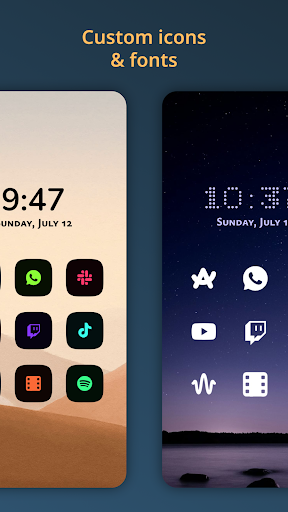
🥭 Mango Launcher is the minimal, fast & customizable Android launcher that puts simplicity and efficiency first. With a clean and straightforward design, it makes it easy to access, organize, and personalize your apps without the clutter. Some of the key features of Mango Launcher include: ✨ Minimal home screen A clean, uncluttered home screen that puts your most important apps front and center. Display your apps as a list, grid, or mosaic, with your wallpaper always in view. Try our unique physics-based layout, where your apps pile up and respond to your touch and your phone's movement, or enable the powerful Pie layout, where you open apps with gesture-based app wheels. ✍️ Scribble widget Write letters to instantly find and open apps, or create your own drawing shortcuts to launch apps, websites, and system actions with a simple gesture. ⚡ Powerful app drawer Quickly search your apps and automatically open the first result. A one-handed alphabet scrubber lets you jump to any app with a single drag. 🎨 In-depth customization Use any icon pack, reshape icons with adaptive shapes and colors, customize individual app colors, pick from a wide range of bundled fonts, and choose an accent color from your wallpaper or your own. Position the home screen at the top or bottom, reorder every element, and personalize the launcher exactly how you like it. 🖼️ Wallpapers & visual effects Use any image from your library as your wallpaper, enjoy beautiful daily wallpapers, and enhance your home screen with elegant frosted glass effects that can be enabled or disabled whenever you want. 🧩 Widgets A full widget screen with a flexible grid. Freely resize, move, and arrange widgets across multiple pages, place widget stacks on your home screen or inside app folders, and quickly find widgets with improved previews and search. 📁 App folders Each app is a folder that can hold related apps, widgets, and app shortcuts, all in one place. 👆 Gestures Swipe down for notifications, lock your phone with a gesture, or map one, two, and three-finger swipes to open any app. ⏱️ Weather, battery & app timers See the weather and battery status directly on your home screen, and keep track of your app usage with built-in app timers and screen time indicators. 🔔 Notification badges See unread counts on your home screen, drawer, and folders as a dot or number, plus an animated badge for the app playing media. 🔒 Private space A separate, biometric-locked space for sensitive apps, hidden until you unlock it. 📱 Built for every device Optimized for phones, foldables, and tablets, with layouts that adapt beautifully to every screen size. 🌍 Localized Heavily localized. Available in more than 50 languages. 🔐 Privacy first No data is ever sent to anyone. No ads to distract or disrupt your experience. Whether you're looking for a launcher that's easy to use or one that simply gets out of your way, Mango Launcher is the perfect choice. If you want a minimalistic, hassle-free experience on your Android device that also prioritizes your privacy and is ad-free, give Mango Launcher a try today! Accessibility Service: Mango Launcher uses the Accessibility Service exclusively to lock your screen when you trigger a lock action (a home gesture or a Scribble shortcut). While this permission allows observing screen interactions, Mango Launcher never reads, collects, or shares any screen content or user data. This feature is optional and disabled by default, and can be turned off at any time in your system's accessibility settings. Location: Mango Launcher uses your device's approximate (coarse) location exclusively to show local weather on your home screen. Your location is sent directly to our weather provider, Open-Meteo, solely to fetch the forecast for that location and is never stored, logged, or shared by us for any other purpose. This feature is optional and disabled by default.
0 years on Google Play
This app isn't currently appearing in any tracked top charts.