
Switchly - App Blocker
Updated Jun 16, 2026 · v2.1.6



Block distracting apps with profiles, schedules, NFC, QR, and barcode keys.
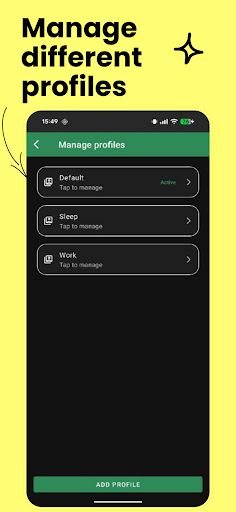
Stay focused. Stay in control. Switchly helps you block distracting apps, manage multiple profiles, and automate your routines with one tap, schedules, NFC tags, QR codes, barcodes, Wi-Fi, Bluetooth, or location triggers — all with a clean, privacy-first experience. 🚀 What Switchly Does: • Create multiple profiles for Work, Study, Sleep, Driving, or anything you need • Block selected apps quickly and reliably • Use NFC tags to enable, disable, toggle, or switch profiles • Use Switchly QR codes and barcodes as physical unlock/control keys • Add Quick Settings tiles for fast access to Switchly, QR scanner, and barcode scanner • Create time/day schedules for automatic switching • Use optional Wi-Fi, Bluetooth, and location triggers for smarter automation • Temporarily disable or enable blocking when needed • Use Emergency Unlock as a limited safety bypass • Manage keys, paired tags, QR codes, and barcodes in one place • Backup and restore your setup using local files or optional cloud backup • Customize the app with accent colors and a clean Material UI • No ads, no unnecessary accounts, and no selling of personal data 🔐 Accessibility Service Usage: Switchly uses Android’s Accessibility Service API for its app blocking feature. This is required so Switchly can detect when a selected app is opened and enforce the blocking rules you configured. Switchly uses Accessibility Service to: • Detect which app is currently in the foreground • Check whether the opened app is blocked in your active profile • Show a blocking screen or return you away from the blocked app • Keep your configured blocking rules active while switching apps What Switchly does NOT do: • It does not read your messages • It does not read typed text, passwords, or keystrokes • It does not record audio or video • It does not collect or sell personal data • It does not share your data with third parties All blocking and profile logic runs locally on your device. The Accessibility Service is optional and must be enabled manually by you in Android Settings. Without it, profile switching and automation can still work, but app blocking cannot be enforced reliably. 🎯 Perfect For • Students and professionals who want fewer distractions • Anyone who wants a simple but powerful focus mode • NFC, QR, and barcode automation setups • Desk, car, door, notebook, or glove compartment unlock keys • People who want automatic routines based on time, Wi-Fi, Bluetooth, or location • Minimalists who prefer privacy-focused, local-first tools • Parents who want quick local app restrictions Switchly keeps distractions away so you can focus on what matters — your time, your control, your flow.
1 year on Google Play
This app isn't currently appearing in any tracked top charts.