
e-Processo
Serviços e Informações do Brasil
Updated Aug 10, 2026 · v10.0.1




Consult and monitor processes at the Federal Revenue, CARF and PGFN
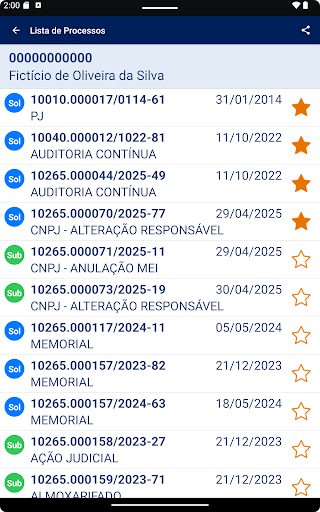
View and monitor ongoing cases at the Federal Revenue Service (RFB), the Federal Revenue Service (CARF), and the Federal Revenue Service (PGFN). This version of the e-Processo app offers the following services: - View cases by CPF/CNPJ (Individual Taxpayer Registry) - View case number - View basic case information - View interested parties in the case (joint and subsidiary parties) - View case history - View documents attached to the case *** - View and control the list of cases being monitored (favorites) - Receive alerts about the progress and electronic acknowledgment of the case - Receive alerts whenever a new document is attached to a case marked as a favorite - Send a request to attach documents to the case *** - Configure PUSH notifications *** The document attachment request is only available for cases in RFB or CARF units. *** To view or copy documents and request attachments, you must: - authenticate in the e-Processo app using your Silver or Gold GOV.BR account; or - register your mobile device (smartphone or tablet) on the RFB's e-CAC portal and then activate it in the app. To register your mobile device, log in to e-CAC with your Silver or Gold GOV.BR account. Select "Legislation and Procedure" / "Digital Procedures (e-Processo)" and then access the "Mobile Device Registration" service. When registering, enter a device name, activation code, authorization expiration date, and select the e-Processo service. After registering, view process documents in the e-Processo app using your CPF/CNPJ (Brazilian taxpayer ID) and confirm the same information (name and activation code). Your device will be authorized to access the documents. If you wish to cancel the service on your mobile device, log in to the e-CAC “Mobile Device Registration” again and delete the device.
8 years on Google Play
This app isn't currently appearing in any tracked top charts.