
My Clock Screensaver App
Updated Apr 15, 2024 · v4.1.1




Enhance your Android display with this screensaver app. Customize clocks easily.
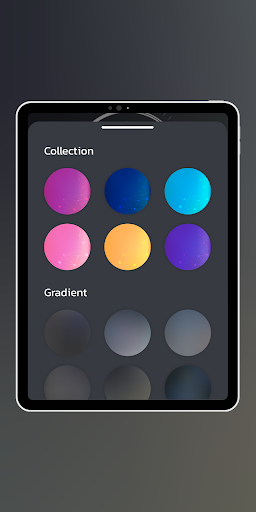
Introducing My Clock Screensaver App, your go-to solution for transforming the idle screen of your Android device. With this app, you can fully personalize your screen by choosing to activate or deactivate analog and digital clocks individually, allowing you to tailor your device's appearance to match your unique style and preferences. Whether you prefer the classic charm of an analog clock or the modern convenience of a digital one, My Clock Screensaver App puts the power in your hands to create the perfect look for your device's idle screen. Stay Organized Effortlessly stay organized and on top of your schedule with My Clock Screensaver App. Seamlessly integrate alarms and appointments from your Android calendar or internal event database, ensuring that important reminders are always at your fingertips. Never miss a beat as essential notifications are conveniently displayed right on your screensaver, keeping you informed and in control throughout your day. Customize Your View Customize your screensaver experience with precision using My Clock Screensaver App. Enjoy the freedom to tailor your display with a customizable date and weekday view, complete with a variety of flexible formatting options. From choosing your preferred date format to selecting the layout that matches your taste, our app ensures that your screensaver reflects your unique style and preferences down to the last detail. Enhance Aesthetics Elevate your visual experience with My Clock Screensaver App's customizable color options. Fine-tune the background and clock colors to craft a visually captivating display that seamlessly integrates with your device's aesthetics. Whether you prefer bold and vibrant hues or subtle and understated tones, our app empowers you to create a stunning screensaver that perfectly complements your device's overall look and feel. Seamless Integration Transform your device's idle screen into a functional and stylish centerpiece with My Clock Screensaver app. Seamlessly integrate it as your Android system screensaver ("DayDream") on smartphones and tablets, ensuring easy access and enhanced functionality. Plus, extend its compatibility to Android TV devices and Chromebooks, effortlessly integrating elegance and utility into your entire entertainment setup. With My Clock Screensaver app, elevate every aspect of your digital experience, from personal productivity to leisurely entertainment, with unmatched sophistication and convenience. Elevate Your Android Experience Unlock the potential of your Android device with My Clock Screensaver app, available for FREE download. Elevate your digital experience by adding a personalized touch of sophistication and convenience to your screens. With a range of customizable features and seamless integration options, My Clock Screensaver app empowers you to transform your device into a personalized timepiece that reflects your unique style and enhances your daily routine. Download now and discover a new level of functionality and elegance for your Android device. The clock screensaver app is completely FREE to download. Enjoy! Disclaimer:The app works well on Android version 13 and newer.
2 years on Google Play
This app isn't currently appearing in any tracked top charts.