PDF Compressor - Reduce File
Updated Apr 4, 2026 · v2.3.0



PDF Compressor & Tools - Compress, Merge, Split, Fast!
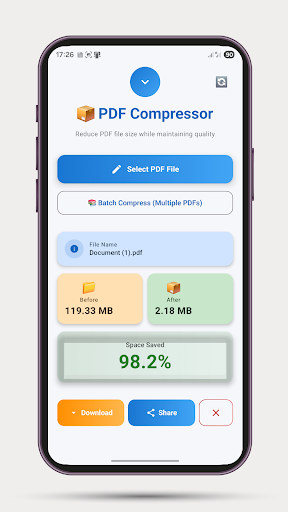
📦 PDF Compressor - The Ultimate PDF Size Reducer Compress your PDF files effortlessly and reduce their size by up to 90% while maintaining excellent quality. Whether you have invoices, documents, ebooks, or presentations, PDF Compressor makes your files smaller and easier to share. ⭐ KEY FEATURES: ✓ FAST COMPRESSION • Process PDFs in seconds • Handles documents up to 500 pages • Smart compression algorithm • Maintains text clarity ✓ QUALITY PRESERVATION • Keeps your documents readable • Optimizes images intelligently • No data loss • Professional results ✓ EASY TO USE • Simple one-tap operation • Select PDF, compress, download • No complicated settings • Beautiful modern interface ✓ PRIVACY FIRST • All processing on your device • No cloud upload required • Your files stay private • Secure compression ✓ POWERFUL FEATURES • Real-time progress tracking • Before/After size comparison • Save to Downloads folder • Share compressed files instantly • File rename option • Batch compress multiple PDFs at once • Dark/Light/System theme toggle 🛠️ PDF TOOLS: • Merge PDFs - Combine multiple PDFs into one • Split PDF - Extract page ranges into separate files • Extract Images - Export pages as PNG or JPEG • Page Editor - Reorder, rotate, and delete pages 📊 PERFECT FOR: • Students - Compress textbooks and study materials • Professionals - Reduce contract and report sizes • Small Businesses - Share documents via email easily • Anyone - Make PDFs easier to store and send 💡 HOW IT WORKS: 1. Tap "Select PDF File" or "Batch Compress" for multiple files 2. Choose your document(s) 3. Watch as they compress automatically with progress tracking 4. Download or share your compressed PDFs instantly 5. Tap notification to open file location 🎯 WHY CHOOSE PDF COMPRESSOR? ✓ Completely FREE to use ✓ No file size upload limits (up to 500 pages) ✓ Works offline - no internet needed ✓ No watermarks added ✓ Ad-supported but fair ✓ Fast and reliable ✓ Regular updates 📈 COMPRESSION RESULTS: • Average compression: 50-80% • 10MB PDF → 2-3MB • 50MB PDF → 10-15MB • Perfect for email attachments (most have 25MB limits) 🔒 SECURITY & PRIVACY: Your files are processed entirely on your device. We never upload your PDFs to any server. Your privacy is our priority.
0 years on Google Play
This app isn't currently appearing in any tracked top charts.