Secured Notes
Updated Apr 13, 2026 · v5.0.0



Securely store encrypted notes, contacts, passwords, and other private info
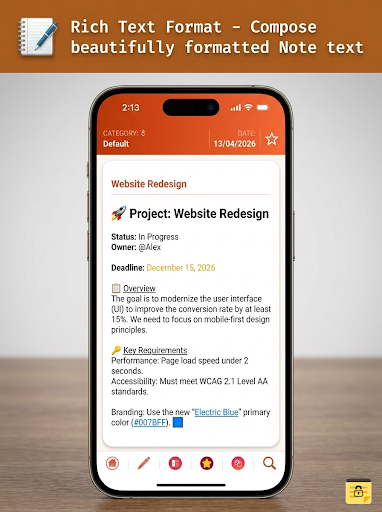
🔒 Secure Notes – Encrypted Private Notes & PasswordcProtected Journal Secure Notes is a simple, powerful, and secure app to store your encrypted notes, passwords, bank details, contacts, and other confidential information. Your data is protected with strong encryption, password protection, and biometric authentication, ensuring complete privacy. Whether you need a private notes app, secure journal, or a way to store sensitive information, Secure Notes keeps everything safe in one place. ✨ KEY FEATURES : 🔐 Encrypted Notes & Password Protection All notes are fully encrypted and secured with a password or biometric authentication. 📓 Private Notes & Secure Journal Store personal notes, passwords, financial details, and confidential information securely. ☁️ Note Auto Backup to Google Drive Automatically back up your encrypted notes safely to your Google Drive. 🔄 Backup & Restore (Encrypted) • Take backups anytime • Transfer notes across devices • Restore securely with encryption 📱 Cross-Device Restore Restore and access your notes on any device. 🔍 Advanced Search & Filters Quickly find your notes using search and category filters. 🗂️ Organize with Categories Easily manage and structure your private notes. ✍️ Rich Text Formatting Create clean and well-structured notes. ⏱️ Auto Lock for Security App locks automatically when idle to protect your data. 🧬 Biometric / Fingerprint Authentication Add an extra layer of protection to your secure notes. 🚫 Ad-Free Experience Enjoy a clean and distraction-free interface. ✅ WHY CHOOSE SECURE NOTES • Simple and easy to use • Strong encryption for maximum security • Password protected notes accessible only to you • Reliable private notes and secure journal • Built-in note auto backup for peace of mind ⚠️ IMPORTANT NOTE The default password is 1234. Please change it immediately after first login to ensure your data is secure. 🔐 PERMISSIONS EXPLAINED • Identity & Contacts – Required to select a Google account for backup • Storage Access – Required to import and export encrypted backups • Network Access – Required for secure cloud backup • Prevent Sleep – Ensures uninterrupted backup process
8 years on Google Play
This app isn't currently appearing in any tracked top charts.