
BiBi Keyboard Pro - AI ASR
Updated Jul 26, 2026 · v4.3.0




AI-driven voice input tool, multi-engine recognition and protecting your privacy
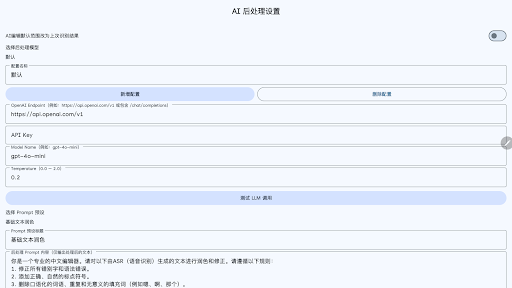
BiBi Keyboard is a new generation AI-powered voice input keyboard that brings a professional-grade speech recognition experience to your Android device. Whether it's for chatting, writing, or note-taking, smart voice input makes everything faster and more accurate. AI-Powered • Multi-Engine • Offline Available • Privacy-First 1. Choose from 8 leading speech recognition services, or use the built-in offline model: • Volcano Engine, OpenAI Whisper, Google Gemini • SiliconFlow, ElevenLabs, Alibaba Cloud BaiLian, Soniox • SenseVoice/Paraformer/Zipformer (Offline) - No internet required 2. Privacy-First Design • Collects no data • Direct connection to service providers • Fully offline mode available • Local storage only 3. Supports AI-powered post-processing • Automatic punctuation and formatting optimization • LLM-powered text refinement • Voice command editing (AI editing) • Multi-scene preset prompts 4. Floating Ball Mode (requires AccessibilityService API permission) • Use voice input on any keyboard • Cross-app and cross-input method usage • Visual recording feedback • Quick access menu 5. Modern Material3 Design • Monet dynamic color themes • Compact keyboard layout • Three height options available • Dark mode support 💡 Use Cases • Professionals writing emails and documents • Students taking class notes • Content creators drafting scripts • Users who prefer voice input • Scenarios requiring offline recognition Full support for Simplified Chinese, Traditional Chinese, English, and Japanese interfaces. The recognition language depends on the ASR service you configure. 【Accessibility Service Usage】 This app uses Android's Accessibility Service API for the "Floating Ball" feature only: • Detects when text input fields are focused across any app • Inserts speech recognition results directly into the focused input field • Detects when on-screen keyboards appear/disappear
0 years on Google Play
This app isn't currently appearing in any tracked top charts.