
Call Forwarding: Divert Calls
Updated Jul 8, 2026 · v1.3.1



Manage call forwarding, conditional divert & call waiting with one tap. Private.
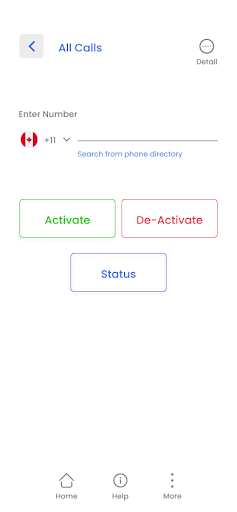
Never miss an important call again. Call Forwarding helps you set up, manage, and check call divert settings on your phone — without memorizing USSD codes like *21*, *61*, or *#21#. Whether you need every call forwarded, only unanswered calls, busy lines, or unreachable scenarios, this app gives you one-tap controls backed by your mobile carrier. ━━━━━━━━━━━━━━━━━━━━ WHY USERS CHOOSE CALL FORWARDING ━━━━━━━━━━━━━━━━━━━━ ✓ One-tap activate & deactivate — no code memorization ✓ Live status sync with your carrier network ✓ Conditional forwarding rules (busy, no answer, not reachable) ✓ Adjustable ring delay (5–30 seconds) before divert ✓ Call Waiting controls built in ✓ Activity log to track forwarding actions ✓ Private by design — settings stay on your device ✓ Google Sign-In only — no passwords to manage ✓ English & Hindi support ✓ Light & dark mode ━━━━━━━━━━━━━━━━━━━━ FORWARDING MODES ━━━━━━━━━━━━━━━━━━━━ 📞 All Calls Forward every incoming call to another number — ideal when you’re traveling or using a second phone. 📵 Not Reachable Automatically divert calls when your phone is off, in airplane mode, or out of network coverage. ⏱️ Not Answered Set how long your phone rings (5–30 seconds) before calls forward to your backup number. 🔀 All Conditional Configure busy, unreachable, and no-answer forwarding together in one place. 📲 Call Waiting Manage call waiting settings so you stay in control during active calls. ━━━━━━━━━━━━━━━━━━━━ SMART FEATURES ━━━━━━━━━━━━━━━━━━━━ • Check Status — verify live forwarding state with your carrier (*#21# and related codes) • Quick Select — pick numbers from contacts or recently used destinations • Rules Engine — manage multiple forwarding scenarios from one dashboard • Help Center — step-by-step guides for setup and troubleshooting • Status badges — see Active/Inactive forwarding at a glance on Home ━━━━━━━━━━━━━━━━━━━━ PRIVATE & SECURE ━━━━━━━━━━━━━━━━━━━━ Your call forwarding settings are stored on your device and connect directly through your carrier network. We use Google Sign-In only to verify your identity — your forwarding data is not sold or shared. ━━━━━━━━━━━━━━━━━━━━ HOW IT WORKS ━━━━━━━━━━━━━━━━━━━━ 1. Sign in with Google 2. Choose a forwarding type (All Calls, Not Answered, etc.) 3. Enter your destination number 4. Tap Activate — the app dials the correct carrier code for you 5. Tap Check Status anytime to confirm with your network Works with standard GSM carrier USSD/MMI codes. Availability and codes may vary by operator and region. ━━━━━━━━━━━━━━━━━━━━ GO AD-FREE WITH PRO ━━━━━━━━━━━━━━━━━━━━ Love the app? Upgrade to Call Forwarding Pro — same trusted tools, zero ads, no upgrade prompts. Search “Call Forwarding Pro” on Google Play. ━━━━━━━━━━━━━━━━━━━━ SUPPORT ━━━━━━━━━━━━━━━━━━━━ Questions or issues? Use in-app Help or contact support from your Profile screen. We’re here to help. Note: Call forwarding is a carrier service. Standard network rates may apply. This app does not provide VoIP or cloud calling — it helps you manage your existing mobile divert settings.
7 years on Google Play
This app isn't currently appearing in any tracked top charts.