
BNK 부산은행 기업뱅킹
Updated Jun 16, 2026 · v1.5.5



Busan Bank Corporate Banking convenient for businesses! Use the newly born Busan Bank corporate banking more conveniently and smartly.
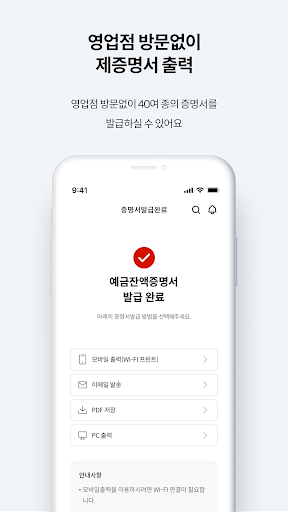
Busan Bank Good Bank Enterprise has been reborn as Busan Bank Enterprise Banking. If you have any questions about Busan Bank Enterprise Banking, please contact Busan Bank Customer Center (1588-6200). (Consultation hours: Weekdays 09:00 ~ 18:00) ■ Convenient home screen for business owners ─ Recent transaction history of accounts at a glance ─ Check the status of funds by viewing a large number of accounts at once ■ Easy authentication for convenient login ─ Say goodbye to complicated public certificates! Fingerprint, pattern, simple password login to transfer ─ Available to both CEO and employees ■ Faster, more convenient transfer ─ Fast and convenient transfer with minimal touch ■ Find utility bills to be paid at our business site at once ─ Check utility bills to be paid at once for our company without any other input ─ All at once until payment ■ Print certificates without visiting a branch office ─ You can issue over 40 types of certificates without visiting a branch office ■ Department-specific card inquiry ─ You had too many cards and it was difficult to manage them. You can search by dividing the cards by department ■ Guide to permissions and purpose of use for using Busan Bank corporate banking app [Required] Phone: Collects and shares mobile phone number and device information for mobile phone user authentication and device authentication, login, push, fraud prevention, etc. [Required] Photos and videos: Used for submitting and storing joint certificates, terms and conditions PDFs, transfer confirmation certificates, bankbook copies, certificate photos, and other document files. (This permission is not used from Android version 11) ᆞRequired access rights are absolutely necessary for using the service, and if access rights are denied, it will not work properly. [Optional] Location: Find a branch/ATM [Optional] Notification: Push message and notification service [Optional] Camera: Non-face-to-face real-name verification, utility QR payment, joint certificate copy, Internet banking login - Optional access rights can be used even if you do not agree. However, use of some services may be restricted.
3 years on Google Play
This app isn't currently appearing in any tracked top charts.