
GlassFX - Glass Icon Pack
Updated Jun 6, 2026 · v1.1.0


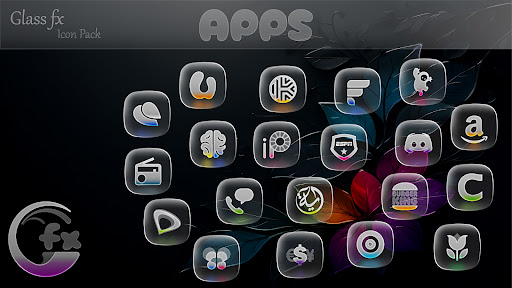


5,000+ premium frosted glass icons for Samsung One UI, Nova, and more.
Transform your Android experience with the crystalline elegance of GlassFX. GlassFX isn't just an icon pack; it’s a complete aesthetic overhaul. Each icon features a meticulously crafted "frosted glass" effect with realistic translucent layers and subtle shimmer, bringing a sense of premium depth to your home screen. [Key Features] 5,000+ Ultra-High Quality Icons: Rendered in 2K resolution for maximum clarity. Dynamic Frosted Effect: Icons adapt to your wallpaper, letting colors bleed through the glass texture. 100+ Matching Wallpapers: Specifically designed to make glass icons pop. Comprehensive Support: Works on Samsung One UI, Pixel, and 3rd-party launchers. [How to Apply (Samsung One UI)] Samsung users can easily apply GlassFX using Theme Park (part of the Good Lock suite): Open Theme Park. Select Icon > Create New. Tap Icon Pack and select GlassFX. Save and Apply your new theme! [How to Apply (Other Launchers)] Install a supported launcher (Nova, Niagara, Lawnchair, etc.). Open GlassFX app. Go to the Apply tab and select your launcher. If your launcher isn't listed, apply it via your launcher's icon settings. [Supported Launchers] Samsung One UI (via Theme Park) Nova Launcher Niagara Launcher Smart Launcher Lawnchair / Action / Pixel ...and many more! Contact: Email : screativepixels@gmail.com Twitter: https://twitter.com/Creativepixels7
0 years on Google Play
This app isn't currently appearing in any tracked top charts.