
TV DocX Viewer
Updated Mar 19, 2026 · v1.0.3-G


Professional DOCX Viewer for Android TV
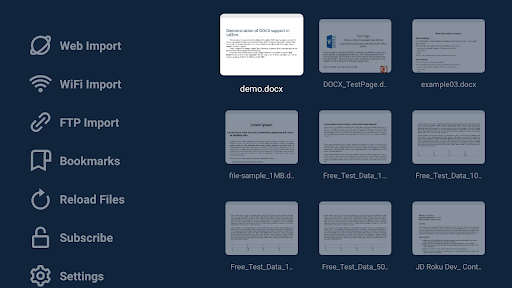
TV DocX Viewer is a powerful and easy-to-use DOCX viewer for Android TV that helps you open, read, and manage Word documents directly on your television. Whether your files are stored on a USB drive or imported wirelessly, this app gives you a smooth TV-friendly reading experience designed specifically for remote control navigation. If you are looking for a reliable document viewer for Android TV, Word document reader for TV, or a simple way to open DOCX files on a smart TV or Android TV box, TV DocX Viewer is built for you. The interface follows Android TV design principles, making it easy to browse files, open documents, and use advanced reading tools from your couch. With automatic USB scanning, the app detects DOCX files and displays them with file names and thumbnails for quick access. You can also import files using Web import, WiFi import, or FTP import, giving you flexible ways to send documents to your TV. Web import supports token-based access and does not require your sending device to be on the same network, while WiFi and FTP import are ideal for local transfers. QR codes on supported import pages make connection even easier. TV DocX Viewer is more than a basic DOCX file opener. It includes useful reading and navigation features to improve the document viewing experience on large screens. The app remembers your last used settings, including zoom, orientation, last viewed page, and night mode, so you can continue reading from where you left off. Key features include: - Open and view DOCX files on Android TV. - Auto scan USB drives for DOCX documents. - View file thumbnails and file names in a TV-optimized browser. - Import DOCX files using Web, WiFi, or FTP. - Use QR codes for faster connection on supported import pages. - View file details like name, location, size, and last modified date. - Bookmark pages for quick access later. - See all bookmarks across documents in one place. - Open bookmarks with page thumbnail, page number, and document title. - Search text inside DOCX files. - Go directly to a specific page. - Zoom in, zoom out, and reset zoom while reading. - Use horizontal scroll when zoomed in. - Enable night mode for comfortable viewing in dark environments. - Reload and rescan storage when new files are added. - Check app and device details in settings, including storage and document statistics. - Clear imported files, thumbnails, and bookmarks from settings when needed. The in-document options menu appears as an overlay, allowing you to see live page changes while adjusting zoom or toggling night mode. This makes reading DOCX files on TV more interactive and convenient than many generic file viewers. The app also includes a help and FAQ page, support and feedback links, version info, developer details, privacy policy, and terms of use pages for a complete user experience. Subscription and subscription management pages are included as well. Whether you want a DOCX reader for Android TV, a Word file viewer for smart TV, or a simple way to read office documents from USB and wireless imports, TV DocX Viewer delivers a clean and practical experience built for the big screen.
0 years on Google Play
This app isn't currently appearing in any tracked top charts.