
Pulse Oximeter - Beat & Oxygen
Updated Oct 12, 2025 · v1.4.0


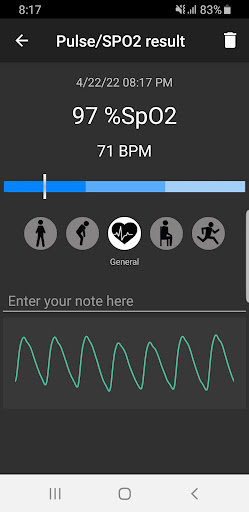


Measure your oxygen saturation (SPO2) and heart rate with built-in sensors.
Check your oxygen saturation and heart rate anytime, anywhere with the Pulse Oximeter app and your built-in sensor - at your home or office - when you wake up, relax, before and after exercise. This app only works with built-in sensors on these Samsung devices: Galaxy Note4/Edge/5/7/8/9 and Galaxy S6/7/8/9/10 include plus variant. App used an advanced algorithm to calculate oxygen saturation from the sensor's raw infrared and red signal output, similar to how a dedicated pulse oximeter works. Instant and excellent for monitoring your fitness. FEATURES: - Measure range for SPO2: 70%-100%, for heart rate: 30-190 BPM. - Fast or continuous measurement. - Save results with tags for access later. - Real-time pulse graph (PPG - photoplethysmogram). - Reminder: Automatic reminds you to measure your oxygen saturation and heartbeat daily. - Share your heart rate and SPO2 screenshot on social media. - Export history to CSV or PDF file format; PDF format includes PPG graph. (Paid feature). - Back up, restore and transfer your data. (Paid feature) Please note that the free version allows only 3-5 measurements daily with ads display; you can purchase IN-APP to get unlimited measurement, additional features, and no ads. VERIFY AND CALIBRATION: - "Hold the breath" will reduce your blood oxygen level; for most people, it's safe to hold your breath for a minute. We tested with the "hold the breath" method for 30 seconds, the oxygen saturation will go down to about 94%, but it depends on your condition. Open app Settings, change the "Auto-stop after" option to 2 minutes, and you can start the testing. You can see our test video: https://youtu.be/fVtCBf-8DfI and https://youtu.be/M9q8iCyw9uI. - Calibrate the app: choose the option in Settings -> Calibration -> "Alternative" or another variant; if you see the result higher/lower than expected, you can also compare it to other devices at the same time (one on the left hand, one on the right hand, each finger with one device). You can try the "hold the breath" method to calibrate the app. - Recommend calibration: 'Default': S6, S9, S9+, S10, S10+, Note5, Note9 'Alternative': S8, S8+, Note7/FE, Note8 'Alternative 2': Note4, S7, S7 Edge DISCLAIMER: - Note that the built-in sensor in the phone has limitations, so this app will never replace a medical-grade pulse oximeter. - Our app should not be used as a medical device/product; designed for general fitness and wellness purposes only. Consult your doctor or primary care physician if you require medical purposes. - Our app is not intended for use in diagnosing disease or other conditions or in the cure, mitigation, treatment, or prevention of disease. - Our app is not tested/verified accuracy on all supported devices; please use it at your own risk. *** We welcome your ideas and suggestions; please email us at: support@pvdapps.com
6 years on Google Play
This app isn't currently appearing in any tracked top charts.