
엑스키퍼 아이
Updated Jul 13, 2026 · v6.1.20


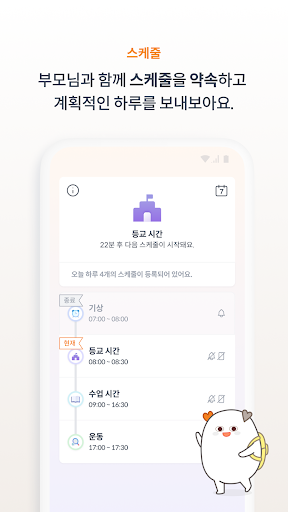


XKeeper's app for children helps manage children's smartphones as well as schedules.
===This app uses device administrator permissions.=== ===Accessibility. API usage notice=== XKeeper Eye collects interaction and data between users and terminals with XKeeper Eye installed for the functions specified in the items below. Xkeeper Eye does not collect any data other than user data for the purposes of the functions below using the Accessibility Service API. - Collected data: app interaction, in-app search history - Purpose of collection: To determine which app is displayed on the screen of the terminal currently in use. If necessary, detect launch events for specific apps or disable apps that are harmful to your child if they are running. - Collected data: Web visit history - Collection purpose: Accessibility service API is required to find out the URL of the site being accessed through the browser app (ex: chrome browser) currently being used. Monitoring site access is only possible if you can read the value displayed in the URL input field at the top of the browser app, so if you cannot use the accessibility service API, you cannot use the site monitoring function. Additionally, the corresponding API is required to stop the function when accessing a site that is harmful to children. *This app is for Xkeeper children. Please download ‘Xkeeper – Child Smartphone Management’ on your parents’ smartphone. *After installing Xkeeper Child, log in with your parent's Xkeeper ID to complete the installation. *Xkeeper Eye is available for Android smartphones and tablets. ■Xkeeper main functions 1. Custom notification registration function You can register scheduled schedule notifications and desired notifications. 2. Manage smartphone use Aren’t you worried about smartphone addiction? Please adjust your smartphone usage time by scheduling a daily usage time. 3. Lock designated apps and sites Are there any apps, such as YouTube or games, that you don't want your child to use? You can lock access to specific apps or sites! 4. Automatic blocking of harmful substances Various online harmful substances such as harmful illegal sites, UCC, and apps! Xkeeper will protect your child from harmful substances! 5. Schedule management Do you often forget your child’s schedule? You can receive schedule start notifications, location notifications, and even set up a smartphone lock! 6. Real-time location confirmation and child movement notification Are you worried about where your child is? Rest assured with real-time location confirmation and child movement notifications! 7. Real-time screen monitoring Are you curious about what your child is doing with their smartphone? You can check your child’s smartphone screen with the live screen function! 8. Daily report My child’s smartphone usage habits and daily life You can check it through the timeline-type daily report! 9. Weekly/monthly reports You can check your child's smartphone usage habits and interests. We provide weekly/monthly reports! 10. Lost Mode Is your personal information leaked due to losing your smartphone? You can protect information stored on your child’s smartphone with the lost mode function!! 11. Battery check Remotely check your child's smartphone battery capacity Try to prevent unexpected discharge. 12. Instant lock What if you suddenly need to restrict your child’s smartphone use? Lock your device easily and conveniently with just 3 touches. 13. Communication function You can send a message to your parents using Xkeeper. ■Access rights information • Required access rights - Storage access: Normal operation is possible only when storage access permission is granted as required for the video blocking function, one of Xkeeper's mobile functions. - Access to location information: Access to location information is required to collect the location of the device as the permission required for the child location check function, which is one of the Xkeeper mobile functions. - Access to device ID and call information: When installing the product, device ID and contact information are required to identify each terminal and user. Therefore, device ID and call information access rights are required. - Camera access: This is the permission required for the augmented reality immersion blocking function, one of Xkeeper's mobile functions, and is used to draw attention by utilizing the device's camera aperture. ■Homepage and customer support 1. Homepage -Official website: https://xkeeper.com/ 2. Customer support 1544-1318 (Weekdays 9:00 am to 5:00 pm. Closed on Saturdays, Sundays and public holidays) 3. Developer 8Snifit Co., Ltd. https://www.8snippet.com/ 4. Developer contact information #N207, 11-3, Techno 1-ro, Yuseong-gu, Daejeon (Gwanpyeong-dong, Pai Chai University Daedeok Industry-Academic Cooperation Center) Contact: 1544-1318
2 years on Google Play
This app isn't currently appearing in any tracked top charts.