
Zodiac Constellation Watch
Updated Sep 24, 2026 · vVARY


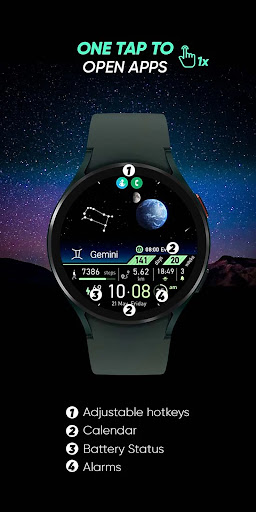


Your constellation is waiting for you in the sky..
🌟 Built for Wear OS [ Only for Wear OS devices - API 33+ ] 🌟 Your constellation is waiting for you in the sky... FEATURES ● 💫 Zodiac constellations and zodiac signs ● 🌍 Animated items (Earth, stars, icons) ● 🎨 10 colour variants ● 🖱️ 2 adjustable hotkey - One tap to open apps ● 🌕 Live moon phases ● 🕒 12/24 H (Based on your phone time setting) ● 👀 Always on display supported ● 📊 Next event / Sunsire sunset / Steps / Distance / Unread notification count / Days of year / Week of year / Calendar ZODIAC SIGNS Zodiac signs change automatically. 1. ♍ Virgo: August 24 – September 23 2. ♎ Libra: September 24 – October 23 3. ♏ Scorpio: October 24 – November 22 4. ♐ Sagittarius: November 23 – December 21 5. ♑ Capricorn: December 22- January 20 6. ♒ Aquarius: January 21 – February 19 7. ♓ Pisces: February 20 – March 20 8. ♈ Aries: March 21- April 20 9. ♉ Taurus: April 21 – May 21 10. ♊ Gemini: May 22 – June 21 11. ♋ Cancer: June 22 – July 23 12. ♌ Leo: July 24 – August 23 📌 INSTALLATION NOTES: 1 - 🔗 Ensure your watch is properly connected to your phone. Open the Phone App on your phone and tap on "DOWNLOAD TO THE WATCH", then follow the instructions on your watch. ⌛ A few minutes after tapping the install button on your watch, the watch face will be installed. You can then select your new watch face! 📱 The phone app serves as a placeholder to make it easier to install and find the watch face on your Wear OS device. ⚠️ Note: If you find yourself stuck in a payment loop, don’t worry! You will only be charged once, even if prompted to pay again. Wait 5 minutes or restart your watch and try again. This could be a synchronization issue between your device and Google servers. 2 - 💻 Alternatively, you can try installing the watch face from a web browser on your PC. ⚠️ Please note that any issues on this side are NOT developer-dependent. The developer has no control over the Play Store from this side. Thank you. 🔑 For full functionality, please manually enable Sensors & receive complication data permissions! WEB https://www.ekwatchfaces.com INSTAGRAM https://www.instagram.com/ekwatchfaces FACEBOOK https://www.facebook.com/ekwatchfaces TWITTER https://twitter.com/ekwatchfaces PINTEREST https://www.pinterest.com/ekwatchfaces YOUTUBE https://bit.ly/2TowlDE
4 years on Google Play
This app isn't currently appearing in any tracked top charts.