
Flora Digital Watch Face
Updated Jul 25, 2026 · vVARY


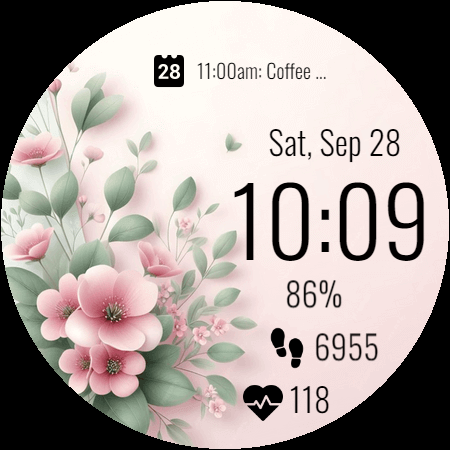


Elegant digital watch face for ladies, providing a special and awesome look.
Elegant digital watch face for ladies(women), providing a special and awesome look. Flora Digital Watch Face is an elegant, feminine design crafted for ladies who appreciate a beautiful blend of style and function. Featuring delicate floral themes in soft pinks and greens, it offers a refreshing and graceful look. Each floral design exudes charm, making it ideal for everyday wear or special occasions. Perfect for women looking for a stylish yet practical watch face that adds a touch of elegance to their day. ⚙️ Watch Face Features • Background Themes • Date, month and day of the week. • 12/24 Hour Time • Heart Rate • Battery % • Steps Counter • Customizable Complications • Color Variations • Ambient Mode • Always-on Display (AOD) • Tap to measure heart rate • Long tap to customize 🎨 Flora Digital Watch Face Customization 1 - Touch and hold display 2 - Tap on Customize option 🎨 Flora Digital Watch Face Complications Touch and hold display to open customization mode. You can customize the field with any data you want. 🔋 Battery For better battery performance of the watch, we recommend disabling the "Always On Display" mode. After installing the Flora Digital Watch Face, follow these steps: 1. Open the Companion App on your phone. 2. Tap "Install on Watch". 3 .On your watch, select the Flora Digital Watch Face from your settings or watch face gallery. Your watch face is now ready to use ! ✅ Compatible with all Wear OS devices API 33+ including such as Google Pixel Watch, Samsung Galaxy Watch etc. Not suitable for rectangular watches. Thank you !
1 year on Google Play
This app isn't currently appearing in any tracked top charts.