
Flora Elegant Watch Face
Updated Aug 4, 2026 · vVARY


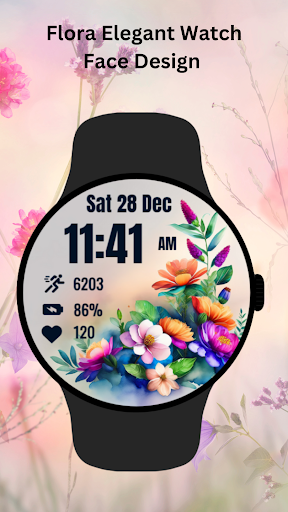


Elegant floral watch face with time,date,steps,battery, and heart rate display.
Enhance your Wear OS device with the Flora Elegant Watch Face! Featuring vibrant floral artwork, this beautifully designed watch face offers a perfect blend of elegance and functionality. With a clear display of time, date, step count, battery level, and heart rate, you can stay informed while enjoying a stunning aesthetic. ⚙️ Watch Face Features • Date, month and day of the week. • Heart Rate • Battery % • Steps Counter • Ambient Mode • Always-on Display (AOD) • Tap to measure heart rate 🔋 Battery For better battery performance of the watch, we recommend disabling the "Always On Display" mode. After installing the Flora Elegant WatchFace Design , follow these steps: 1.Open the Companion App on your phone. 2.Tap "Install on Watch". 3.On your watch, select the Flora Elegant WatchFace Design from your settings or watch face gallery. Your watch face is now ready to use ! ✅ Compatible with all Wear OS devices API 33+ including such as Google Pixel Watch, Samsung Galaxy Watch etc. Not suitable for rectangular watches. Thank you !
1 year on Google Play
This app isn't currently appearing in any tracked top charts.