
My QR
Updated May 18, 2026 · v0.1

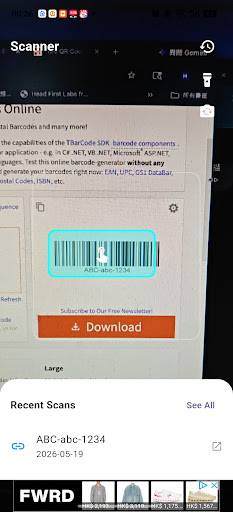


Lightning-fast QR code and barcode scanner! Built-in video/music player with picture-in-picture multitasking support!
My QR is a powerful and versatile QR code and barcode scanning application that goes far beyond simply reading text links! Whether you're scanning a standard webpage URL, product barcode, or video/audio streaming link, this application automatically recognizes the content and presents it to you at lightning speed. Scan easily, securely save your scanning history, and even enjoy the built-in video/audio playback experience. 🚀 Core Features Lightning-fast and accurate scanning: Simply point the camera at the sensor, and the smart viewfinder will instantly lock onto and read the code. Supports a built-in flashlight and front/rear camera switching, making scanning possible even in low-light or complex environments. Smart video/audio detection: Scanned a video/audio link? No need to leave the application! If it's a YouTube video or a direct video/audio link (such as .mp4, .mp3, .wav, .mov), the application will immediately launch its dedicated built-in player for direct playback. Picture-in-picture (PiP) multitasking: Watch videos while doing other tasks. Minimize directly played video or audio files into a system-level floating window, ensuring uninterrupted playback while chatting or viewing documents on your phone. Local Device History Tracking: Never miss any important links. All scan history is stored locally on your device in a secure database for easy access, viewing, or reopening at any time. Clean Dark Viewfinder UI: An intrusive, power-saving dark viewfinder interface designed specifically for camera scanning, combined with a clean and bright local scan log management interface, balancing visual experience and usability. Seamless Web Integration: Standard web URLs, once clicked, instantly open in your phone's default external browser. 🛠️ How to Use: Open the application and point the camera at any QR code or barcode. Tap the highlighted detection box (blue checkbox) on the screen. Witness the application's instant intelligent routing: Regular web URLs open in the browser, while videos and music launch directly in the built-in player! Click the "History" icon at the top of the screen to review and view old scans at any time.
0 years on Google Play
This app isn't currently appearing in any tracked top charts.