
OS 26 Launcher – 2026
Updated Aug 24, 2026 · v8.0


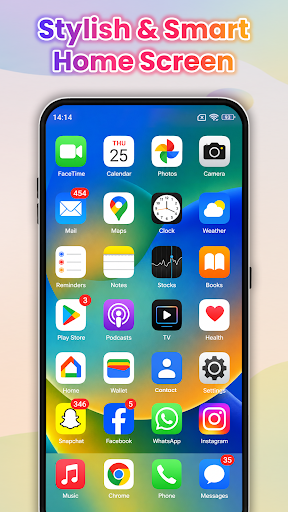
Transform Android with OS 26 Launcher, Widgets, Control Center & Themes.
OS 26 Launcher – Phone OS Launcher 📱 Transform your Android device into a stunning, ultra-modern experience with OS 26 Launcher! Give your Android device a stunning, premium makeover with the OS 26 Launcher! Experience the look and feel of the latest operating system with smooth animations, a glass-inspired interface, and powerful customization—all in a lightweight, battery-friendly package. Breathe new life into your smartphone with a premium, glass-inspired interface, fluid animations, and next-level personalization. Enjoy the clean, organized aesthetic of the latest operating system designs while keeping the freedom and power of Android. No root required, incredibly lightweight, and highly optimized for peak battery efficiency. 🌟 Key Features of OS Launcher ✅ Sleek Home Screen & Grid Setup: Experience a beautifully polished desktop layout. Easily drag-and-drop apps, create smart folders with custom colors, and adjust grid/icon sizes to perfectly fit your style. ✅ Smart App Library: Say goodbye to clutter! Your apps are automatically sorted into intelligent categories, or you can use the super-fast A–Z scroll to find what you need in milliseconds. ✅ Universal Smart Search: Swipe down from anywhere on the screen to instantly search your apps, contacts, system settings, or browse the web. ✅ Premium Widgets & Themes: Access native-styled widgets for Clock, Weather, Calendar and Battery. Fully compatible with your favorite third-party icon packs. 🚀 Built for Speed & Performance Of OS Launcher OS 26 Launcher is engineered to be lightweight and highly efficient. Enjoy premium blur transitions and smooth scrolling effects without experiencing any device lag or heavy battery drain. It works flawlessly across all modern Android versions. 📌 Disclaimer & Permissions Independence: This app is an independent personalization tool designed to enhance the Android user interface. It is not affiliated with, endorsed by, or associated with any company Inc., Google LLC, or any other third-party trademark holder. All product names, logos, and brands are property of their respective owners. Core Functionality: OS 26 Launcher requires standard home screen permissions to function as your default launcher interface. Optional features like weather updates or notification badges will request location or notification access only when needed. Your privacy is our priority—your data stays safely on your device. Ready for a fresh, elegant smartphone makeover? Download OS 26 Launcher today and step into the future of personalization!
0 years on Google Play
This app isn't currently appearing in any tracked top charts.