
Chinese Scanner - Pinyin OCR
Updated Aug 20, 2026 · v1.2


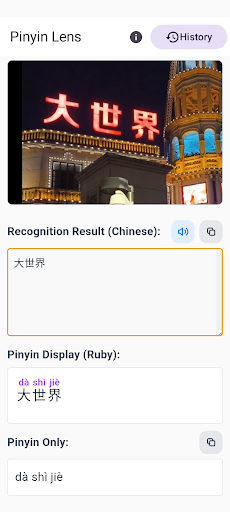

Scan Chinese text from images and automatically add Pinyin.
Pinyin Lens is a Chinese OCR app that reads Chinese text from images and automatically adds Pinyin. Turn Chinese text in photos, screenshots, and saved images into editable text. Check Pinyin and pronunciation, listen to audio, edit or copy the results, and save them for later. 🌟 Key Features 📝 Chinese OCR Read Chinese text from photos and images and convert it into editable text. 🔤 Automatically Add Pinyin Pinyin is automatically added to recognized Chinese text. Pinyin for characters with multiple pronunciations is selected based on sentence context. 🔊 Listen to Chinese Pronunciation Listen to the pronunciation of recognized Chinese text. ✏️ Edit OCR Results Easily edit and correct text that was not recognized correctly. 📋 Copy Chinese Text or Pinyin Copy recognized Chinese text or Pinyin with one tap. Use it in dictionary apps, translation tools, chat apps, or study notes. 📚 History and Categories Save recognized Chinese text, Pinyin, and original images on your device. Organize saved results into categories and review them later. 🔒 On-Device Image Processing Images are processed directly on your device and are not uploaded to an external server. An internet connection is only required for the initial OCR engine setup and model download on first launch. Pinyin Lens is useful for reading Chinese signs, documents, screenshots, and study materials. Scan Chinese text from images, check Pinyin and pronunciation, and save the results for later review.
0 years on Google Play
This app isn't currently appearing in any tracked top charts.