
Sound Meter HQ PRO: dB Level
Updated Mar 10, 2026 · v1.6
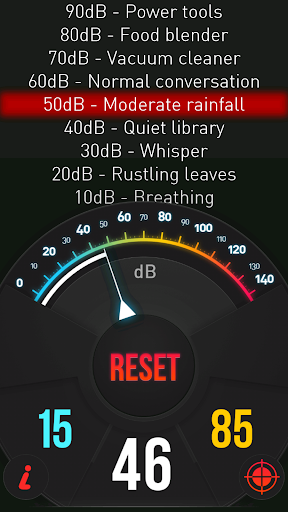


Measure noise levels in real time and test sound intensity with precision.
Application "Sound Meter HQ PRO: dB Level" uses built-in microphone to calculate sound level (noise level) of surrounding. Result of the measurements is displayed in decibels on the screen of you phone. DISCLAIMER: Don't treat this utility app as a professional device to measure decibels. This tool uses built-in microphone, which was designed to capture human's voice. Such microphone is not able to capture sounds above ~90 - 100 dB (Maximum value differs depending on kind of microphone you have). In addition, some devices are equipped with AGC (Automatic Gain Control). This system can also disturb correct sound pressure level measurement. Measured noise level is presented with the help of indicator on the gauge. Loudness level varies between 0 and 140 dB. Besides live noise measurement the application displays also minimum and maximum registered level of the sound. You can clear it any time by using "Reset" button. Moreover our tool displays noise power in descriptive way. Available descriptive sound measure thresholds: 10 dB - Breathing 20 dB - Rustling leaves 30 dB – Whisper 40 dB – Quiet library 50 dB – Moderate rainfall 60 dB – Normal conversation 70 dB – Vacuum cleaner 80 dB – Food blender 90 dB – Power tools 100 dB – Motorcycle 110 dB – Rock concert 120 dB – Chain saw 130 dB – Jet takeoff (100m away) 140 dB – Shotgun Decibel meter calibration: If you have access or you possess professional sound pressure level measurements device (SPL meter) you can use it to calibrate our app. Firstly, check current decibel reading on scientific measurement device. Next open our calibration menu (calibration icon under MAX value) i our app and set the same value using +,- buttons. Features of application: 🔈 quick reaction to sound level change 🔉 decibel level presented on the gauge and in the descriptive way 🔊 minimum and maximum measurements levels. 🔊 possibility of calibration the result according to professional device.
6 years on Google Play
This app isn't currently appearing in any tracked top charts.