
Trace Canvas Pro
Updated May 14, 2026 · v1.0


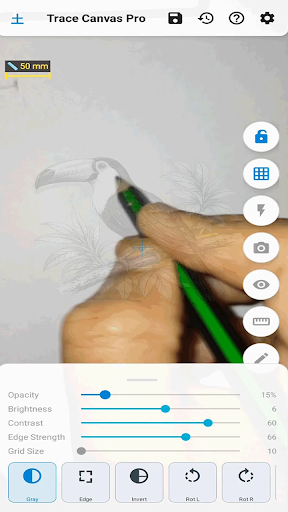

Trace any image onto paper using your phone camera as a live guide.
TraceCanvas turns your phone into a tracing tool — place it above a sheet of paper, load any reference image, and trace directly onto the paper while watching the transparent overlay through the screen. Perfect for artists, kids learning to draw, handprint keepsakes, lettering practice, and anyone who wants to transfer an image to paper accurately. ─── HOW IT WORKS ─── Place your phone on a stand or holder above paper. Import a photo or drawing from your gallery. It appears as a semi-transparent overlay on the live camera view. Adjust position, size, and rotation with your fingers, then trace what you see onto the paper below. FEATURES - Overlay control • Drag, pinch-zoom, and rotate the reference image freely • Adjust opacity to balance visibility of image and paper • Lock the overlay to prevent accidental movement while tracing • Auto-lock after idle — set a timer in Settings so the overlay locks itself once you stop adjusting - Image processing • Grayscale, Invert, and Edge detection modes for cleaner tracing lines • Brightness and contrast sliders • Horizontal and vertical flip • Adjustable edge strength - Alignment guides • Grid, rule-of-thirds, crosshair, symmetry, and level overlays • Adjustable grid size - Distance calibration • Draw a reference mark on paper, then use the built-in calibration tool to set the exact phone-to-paper distance • A yellow ruler appears on screen showing your reference size — match it on future sessions to always trace at the same physical scale • Calibration is saved with each session - Sessions • Save your image, position, opacity, and all settings as a named session • Restore any previous session in one tap to continue exactly where you left off • Sessions remember calibration, overlay state, and all adjustments - Export • Capture the overlay as a processed image • Export edge-detected or adjusted versions directly to your gallery - Camera tools • Tap to focus • Torch / flashlight toggle • Drawing mode hides all controls for a clean full-screen view.
0 years on Google Play
This app isn't currently appearing in any tracked top charts.