
Codora - QR Code/Barcode Tools
Updated Oct 24, 2025 · v6.9


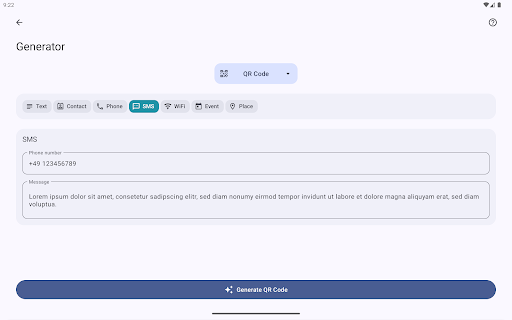


Barcode Tools - Simple. Beautiful. Functional.
Powerful Barcode tools with tons of useful features. Features • Generator • Scanner with multiples modes (Apply action, Decoder, Fast Scan) • Database to store barcodes within the app • History - track your scanned barcodes • Easy handling of barcodes (save, share, export, print etc.) • Extensive help pages with useful explanations and information • User friendly app design • Dark Mode (dark app design) Generator: Generate QR Codes of different types. The following types are available: • URL (web links) • Plaintext • WiFi configuration • Contacts(VCARD) • Location • Event • SMS • Phone Generate other barcodes of different formats • Data Matrix • AZTEC • PDF-417 • EAN-8 • EAN-13 • Code-39 • Code-93 • Code-128 • UPC-A • UPC-E • ITF • Codabar Scanner The following content will be recognized by the scanner: • URLs - all kind of web links • App links to Google Play Store • Email addresses • Phone numbers • WiFi configurations • Contacts (VCARD) • Locations • Events • Product barcodes • Text • SMS Decoder When scanning a barcode in this mode, the action (e.g. open a website) will not be performed but instead the content will be shown. Fast Scan Scan multiple barcodes one after another without any action. You will find your scanned barcodes in the history section marked with an additional label. Image Scanner Detection and decoding of barcodes from image files which are located on your device. Stored barcodes Save created or scanned barcodes directly in the app so that they can be called up at any time. Provide them with a name, description and label. The color of the barcode can also be adjusted. Options to share, export, print, and apply the barcode action are always available. Feedback If you have any problems, suggestions or questions, please send an email to qrtools.app@gmail.com Also leave a positive rating if you like the app. Thank you!
8 years on Google Play
This app isn't currently appearing in any tracked top charts.