
SeePaint: Draw, Sketch & Paint
Updated Aug 9, 2026 · v2.3


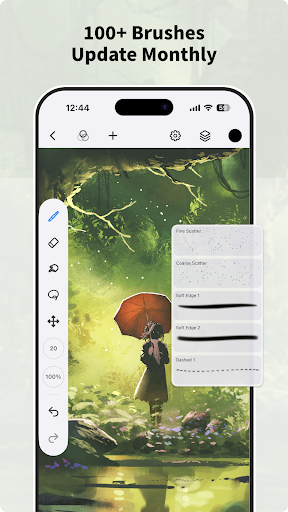


Drawing app to sketch, paint & illustrate. 100+ brushes, PSD.
SeePaint is a free drawing and painting app that gives you professional art tools in a user-friendly layout, helping artists create excellent sketches, paintings, and illustrations. As a drawing app built for digital art, it includes features optimized for pen tablet users, including cursor support for Samsung smartphones. We're not Procreate. SeePaint is becoming a complete pocket art studio with powerful drawing features and more: Light User Interface - A clean interface that maximizes canvas space so you can focus on creation - Quick sliders to adjust brush thickness and opacity instantly - Brand-new dark UI — simpler and more powerful Brush Features - 100+ professional brushes for sketching, inking, painting, and illustration - 37 customizable brush settings for better drawing results - Brush Studio — design your own custom brushes Color Features - Pick the perfect color with the Eyedropper - Paint Bucket fill tool - Previous Color and Color Palette support Layer Features - Well-organized layer interface - Up to 100 layers for efficient creation - Multiple layer parameters and layer groups - 20+ blend modes for industry-grade composition Essential Painting Tools - Stabilizer smooths and perfects strokes in real time - Insert shapes such as lines, rectangles, and ovals - Canvas flip (horizontal/vertical) and symmetry guides - Import images to edit, trace, or use as reference Finishing Effects - Gaussian filters, HSB and RGB adjustment - Adjust hue, saturation, and brightness in real time - Blur and sharpen tools for polished results Multi-Touch Gestures - Two-finger tap to undo - Two-finger pinch to zoom, rotate your canvas - Three-finger tap to redo - Long-press to activate Eyedropper - Tap with another finger to create perfect circles, squares, and angled lines Undo and Redo Save, Export, and Share - Export JPG, PNG, GIF, and PSD - PSD export to continue in Photoshop, SAI, or Clip Studio Paint (CSP) on PC - Export animation and cartoon work as GIF - Share your artwork easily with friends and family Perfect for - Anyone looking for free drawing apps or a drawing app for sketch and paint - Artists who want digital art tools with layers, brushes, and PSD export - Illustration, anime, and cartoon creators who need GIF export - Tablet and stylus users who want a portable art app
0 years on Google Play
This app isn't currently appearing in any tracked top charts.