
Nari - Anti Dumbscrolling App
Updated Jun 25, 2026 · v1.0




Automatically blocks doomscrolling. Reclaim focus & control your screen habits.
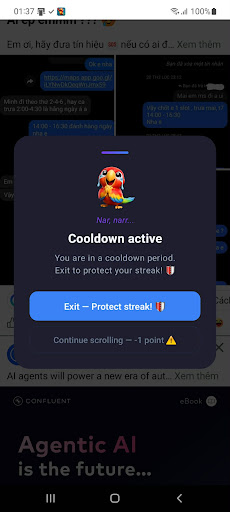
Ever opened Instagram, TikTok, or YouTube — and suddenly realized 30 minutes had passed without you even noticing? You didn't plan to scroll that long. You just... did. That's doomscrolling: mindless, aimless, unstoppable browsing that drains your time, your focus, and quietly rewires your brain to crave cheap dopamine over real productivity. Nari helps you break that loop — automatically, privately, and without judgment. --- HOW IT WORKS Nari runs silently in the background as a foreground service. It monitors which app is currently on your screen. The moment you open one of the apps you've chosen to watch — TikTok, Instagram, YouTube, Reddit, X, or any app you select — Nari starts a session timer. When your scrolling session exceeds the time limit you've set (called T0), Nari immediately draws a popup overlay on top of whatever you're viewing. The popup pauses your session and asks you one simple question: do you really want to keep going? You have two choices: 1. Exit the app. You get +1 point. Nari respects your decision, closes the app, and activates a cooldown lock (called T1) — a window of time during which Nari will intercept any attempt to reopen that app. This is the feature that breaks the "close and immediately reopen" reflex that defeats every other screen time tool. 2. Keep scrolling. You lose -1 point. The session continues. But it was a conscious choice — not a reflex. That alone is more powerful than you'd expect. --- THE COOLDOWN SYSTEM The cooldown (T1) is what makes Nari different from a simple reminder. When you exit an app through Nari, that app is placed in a cooldown state for a duration you define — from 1 to 24 hours. If you try to open the app again during that window, Nari catches it and brings you back to the home screen before you can fall back in. This directly addresses the most common failure mode of digital wellness apps: users dismissing a reminder, then immediately reopening the app anyway. Nari doesn't just remind. It follows through. --- YOUR DAILY SCORE The score isn't about shame. It's about visibility. Seeing a number — especially one going up — creates a feedback loop that's surprisingly effective. Over days and weeks, patterns emerge: what time of day you're most likely to give in, which apps pull you back most often, and how your control is improving over time. You can also tap into your full action history, filtered by today or all time, and even search by app name to review your habits in detail. --- CHOOSE YOUR APPS Nari doesn't make assumptions about what you should and shouldn't use. You decide which apps get monitored. The app selection screen shows all installed launchable apps on your device, complete with icons and names, with a live search bar for fast filtering. Toggle each app on or off with a single tap. Nari only ever intervenes in the apps you've explicitly flagged. --- FULLY CUSTOMIZABLE TIMING You control two key parameters: T0 — Warning Timer: How many minutes of continuous scrolling before Nari steps in. Set it anywhere from 1 to 60 minutes. A good starting point is 10–15 minutes. T1 — Cooldown Window: How long Nari locks an app after you exit it. Set it from 1 to 24 hours. The longer the cooldown, the harder it is to relapse. Start with 1–2 hours and adjust from there. Both settings can be changed at any time from the Settings screen. --- 100% PRIVATE. ZERO DATA COLLECTED. Nari requires Usage Access permission to detect which app is in the foreground, and Draw Over Other Apps permission to show the popup overlay. These are the only permissions needed for Nari to function. --- WHO IS NARI FOR? Nari is for anyone who has ever said "just five more minutes" and meant it — but didn't stop. It's for students trying to protect deep work sessions. For people who want to reclaim their mornings and evenings. For anyone who feels like their phone is using them more than they're using it. That one moment of friction is often all it takes.
0 years on Google Play
This app isn't currently appearing in any tracked top charts.