
LED Blinker Notification Light
Updated Mar 16, 2026 · v26.01.08


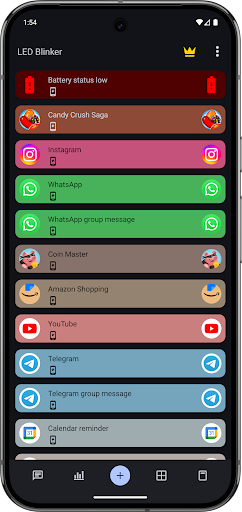


Screen LED, Always on display/AoD, flash control for Facebook, Whatsapp & more!
LED Blinker – The Ultimate Notification Light for Android Never miss a message or call again! Display all your notifications as a blinking LED light or Always On Display (AOD) – even if your smartphone doesn’t have a physical LED. Whether it’s a missed call, WhatsApp, Telegram, Signal, SMS, email, or social media app – you’ll instantly know what happened. Why LED Blinker is the best choice: 🔹 Works on all Android versions (Kitkat to Android 17) 🔹 LED notification or screen LED – depending on your device 🔹 Custom colors for apps & contacts (e.g., all popular messengers, calls) 🔹 Smart Island (BETA) – floating notifications; read messages from everywhere including the lock screen 🔹 Smart filters: Show notifications only if they contain specific text 🔹 Edge lighting & visual effects for extra style 🔹 Per-app settings: Blink speed, colors, sounds, vibration & flash 🔹 Camera flash as an additional alert 🔹 Do Not Disturb schedules per weekday (e.g., at night) 🔹 Light/Dark mode 🔹 Save & restore settings (import/export) 🔹 Widget for quick on/off Compatible with all major apps: 📞 Phone / Calls 💬 SMS, WhatsApp, Telegram, Signal, Threema 📧 Email (Gmail, Outlook, default mail) 📅 Calendar & reminders 🔋 Battery status 📱 Facebook, Twitter, Skype & many more Premium features (in-app purchase): ▪️ Message history incl. deleted messages ▪️ Clickable app icons ▪️ Notification statistics ▪️ Quick-launch sidebar ▪️ All future premium features included Advantages of LED Blinker: ✅ No root required ✅ Minimal battery usage ✅ Privacy – no data is shared, all processing stays on your device ✅ Fast support directly from the developer Note: Please test the free version before purchasing to ensure compatibility with your hardware. The screen LED works on all devices! https://play.google.com/store/apps/details?id=com.ledblinker 📌 Install LED Blinker now and never miss an important notification again! All granted permissions are required for the app to function – fewer permissions are unfortunately not possible. If you encounter problems after an update, please reinstall or restart your device first. Otherwise, just reach out via Facebook or email for help! Facebook http://goo.gl/I7CvM Blog http://www.mo-blog.de Telegram https://t.me/LEDBlinker Disclosure: AccessibilityService API Only used for app functions. Data collection No data is collected or shared – all processing is done locally on your device. The app can start an accessibility service, which is required to display notifications on the Always On Display and improve usability. The app is not an accessibility tool, but it supports people with hearing or visual impairments through screen LED, vibration patterns and notification sounds. In addition the app uses the Accessibility Service to give the user the possibility to enable a sidebar to start apps quickly (better multitasking) without an explicit search and to open apps from everywhere. Furthermore the service is used to show a floating pop-up (Smart island) to open recent notification messages. BETA Test: https://play.google.com/apps/testing/com.ledblinker.pro
13 years on Google Play
This app isn't currently appearing in any tracked top charts.