
(R) Notepad - easy color notes
Updated Oct 31, 2024 · v3.3.1




(R) Notepad There are categories, notes, reminders and color notes, recent list
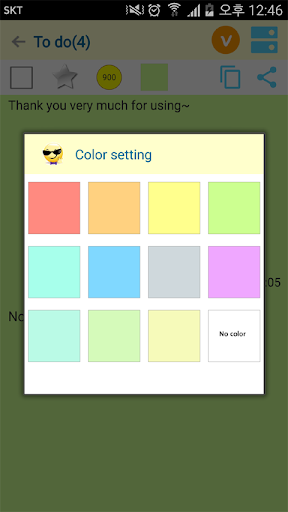
(R) Notepad easy color memo Share your notes with categories and color folder notes. (R) folder notes are useful for scheduling 1) Features of Color Note Can take notes 2) Features of Color Note You can organize and manage your notes by category. There are several categories: To Do, General Notes, Shopping List, Passwords, Books, Sports, Travel and more. Tasks and shopping lists are an important feature for checking that your notes are complete. 3) Features of folder notes If you have a large category and a lot of notes, you can manage them in large groups. 4) Notepad function There are sorting, bookmarks, importance and notifications Notification feature allows you to display important material in the top notification bar 5) Easy note recent list function Displays a list of recently viewed and used category groups, memo categories, and memos. Displays a list of up to 100 recent memos. I use this feature very often 6) memo search and bookmark function You can search the memo contents in the entire search or the corresponding category, and you can see the memo contents in the favorites list. 7) Recycle Bin function If you delete the contents of the memo or folder at once, the memo contents will not be recovered. 8) Share function of note app You can share notes with email or sns by sharing in the note details screen. 9) color notepad backup, restore function You can backup and restore the contents of notes or folders 10) Copy to clipboard, font site control, bookmark function Copy notes to clipboard, adjust font size of notes and set as favorites 11) Copy and move folder and memo contents Copy memo to another folder or group Folders can also be copied or moved to other groups 12) Color setting function There is a color setting function for group, folder, and memo contents. 13) Folder memo function, priority setting You can create various folders under the top category, sort the folders by color, and adjust the output order by adjusting the numbers with priority function. 14) Alarm setting function of color folder Color notes have an alarm function, so if you set the year and time of the year, the color notes will pop up at the specified time. It's a good idea to set color notes as a meeting schedule. 15) Backup / Restore Function I recommend backing up often. Instructions for restoring to another phone are provided below. Have a good time ~ It is designed to be easy for users. Thank you for using (Easy Colors, Folder Notepad) ~ ------------------------------------------------ Restore another device 1. Download the file (email or drive ,,) Location: copy ___ /storage/emulated/0/misonote/miso_note_history.db Use file manager ~ 3. Restore
9 years on Google Play
This app isn't currently appearing in any tracked top charts.