
True Digital Clock
Updated Sep 25, 2025 · v2.3.6

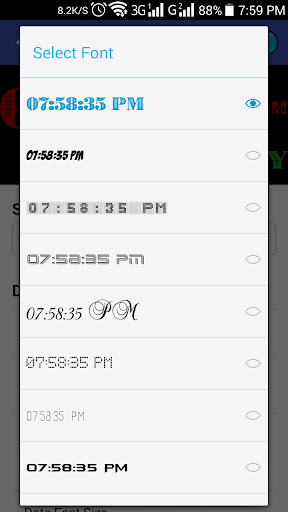


Custom Font True Digital Clock with Second with 3 Layout Design, Free Size
********* No More Disturbing Pop-Up Ads ********* What's New - Added 2 (Two) Layout Design - Custom Font Layout - 115 Fonts - Some Minor Bugs Fixed *** No Pop-up Ads in this App, so you can use it without having any disturbance *** Please take a look at our really pretty Digital Clock Widget. ☆ Fully Free Size oriented digital clock widget, the best home screen digital clock and date widgets for Android with Seconds display. ☆ What you can do with this Apps - Time/LCD Color with Alpha/Opacity - Date Color with Alpha/Opacity - Date Size 20-100dp - Shows Alarm Time - Show/Hide Date - Show/Hide Alarm - Show/Hide Second - Date Style Change - Time Mode 12/24 hour - Show/Hide AM/PM - Widget Background Color with Alpha/Opacity ☆ Support both small screen and big screen HD/Full HD devices ☆ You can Resize as you wish by supporting your Device Screen row/Column ☆ Very easy settings - 24/12 hours-format Digital clock widget is a home screen digital clock and date widget for Android. We try to build the best digital clock widget in the Play Store. Feel free to download, enjoy and welcome feedback. To add the widget to your home screen, use one of the two methods bellow, depending on your launcher and Android version. Method 1.: Long tap on an empty space on your homescreen, then select "Widgets" and search for "Digital Clock" and tap to view the Widget size. Method 2: Open your Apps drawer and tap the "Widgets" and search for "Digital Clock" and tap to view the Widget size. Tap on the Widget to open Settings of your Widget and Select your desire Color, Date format and etc. After Installing and using "Digital Clock", Please, do not for get to Give your Review and Ratings. This is Version 1 and Next Version will come very soon with more Features. Note: DO NOT USE VERY LOW OPACITY, YOU WILL NOT ABLE TO TAP AND OPEN SETTINGS. IF AND YOU CAN GET THE SETTINGS THEN PLEASE OPEN YOUR APPS DRAWER AND FIND "DIGITAL CLOCK" TO OPEN THE SETTINGS.
9 years on Google Play
This app isn't currently appearing in any tracked top charts.