
AI Makeup, Glow Up & Glam Cam
Updated Aug 26, 2026 · v1.1.10


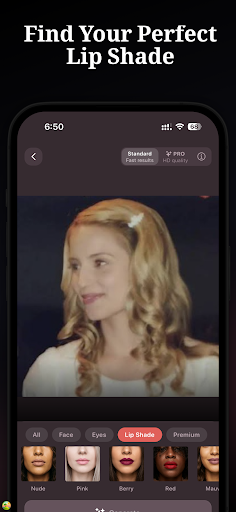


Virtual makeup: try lipstick, eyeshadow, blush, foundation shade and glam looks
Curious how a bold lip color or a fresh foundation shade would look on you? Stop wondering and see it first. Lumora is an AI makeup try on app and beauty editor that lets you experiment with lipstick, eyeshadow, foundation, blush and more on your actual face in seconds. Take a selfie, pick a look, and watch your glow up happen with realistic virtual makeup. No buying products that end up unused in a drawer. No guessing whether a shade suits your skin tone. Just real results on your real face, straight from your phone. 💄 LIPSTICK & LIP COLOR Try on hundreds of lip shades before you buy: ▸ Matte lipstick in every shade from nude to deep plum ▸ Gloss for shiny, plump, light-catching lips ▸ Satin and semi-matte finishes for everyday wear ▸ Bold red, berry, plum and wine lip color for a statement ▸ Nude tones matched to your skin tone ▸ Ombre two-tone gradient lip looks 👁️ EYE MAKEUP See eyeshadow, eyeliner and lash looks on your face instantly: ▸ Eyeshadow: smokey eye, cut crease, halo, natural, shimmer, glitter ▸ Eyeliner: cat eye, wing, smudged, graphic, floating crease ▸ Lashes: natural, dramatic, wispy, voluminous, colored ▸ Brows: filled, feathered, laminated, arched, natural 🌸 FACE MAKEUP Foundation, blush and contour, find your shades before purchasing: ▸ Foundation match: AI scans your skin tone for an accurate foundation shade ▸ Blush: pink, peach, berry, coral and draping techniques ▸ Contour and highlight to sculpt and glow, cream and powder ▸ Bronzer for warm, sun-kissed dimension ▸ Setting finishes: dewy, matte, glass skin, satin 🎨 FOUNDATION SHADE MATCH Finding the right base is the hardest part of makeup. Lumora uses an AI face scan and color analysis to match your foundation shade to your skin tone, so you can compare matte and dewy finishes side by side and shop the right color the first time. 💅 COMPLETE LOOKS & TUTORIALS Full makeup looks curated for any occasion, with step-by-step looks you can follow like a tutorial: ▸ Everyday natural: minimal, no-makeup makeup, clean girl aesthetic ▸ K-Beauty glow: soft, dewy, glass-skin looks ▸ Night out: bold lips, dramatic eyes ▸ Editorial: avant-garde, artistic, runway-inspired ▸ Romantic: soft, classic looks for weddings and events ▸ Office: polished, professional, subtle enhancement 📸 COPY ANY LOOK FROM A PHOTO Saw a makeup look you love online? Use Lumora as your makeup editor to recreate trending looks on your own face. Scan a reference photo, follow it like a tutorial, and adjust until it fits your features. 🎯 WHO USES LUMORA ▸ Makeup beginners learning what suits their face and skin tone ▸ Beauty enthusiasts trying new trends before committing ▸ Anyone shopping for lipstick, foundation or eyeshadow online ▸ People planning event and wedding makeup looks in advance ▸ Content creators previewing makeup looks for photos and videos ▸ Anyone curious about a bold change like a red lip or a new contour ✨ HOW IT WORKS 1. Take a selfie or choose a photo 2. Browse makeup categories: lips, eyes, face, or complete looks 3. AI applies realistic makeup and retouch to your actual face 4. Adjust intensity, shade and finish to your preference 5. Save your favorites and share with friends 🪞 WHY TRY BEFORE YOU BUY Makeup is personal. What looks stunning on a model might not match your skin tone, face shape or style. Lumora lets you see exactly how any makeup look appears on your face before spending money on products. Test that red lipstick. Try a smokey eye. Match your foundation shade. Preview a full look for your next event. All from one selfie, all in seconds. Whether you are debating a new lipstick or matching a foundation shade for your wedding day, see it first with Lumora. 🔒 YOUR PRIVACY Your photos are yours. Lumora processes your selfie to apply makeup and is built to respect your privacy. Use it as a beauty filter for selfies, plan a full makeover or build a glam look for a night out – then recreate your glow up with real products.
0 years on Google Play
This app isn't currently appearing in any tracked top charts.