
NW059: Digital watch face
Updated Aug 4, 2025 · vVARY


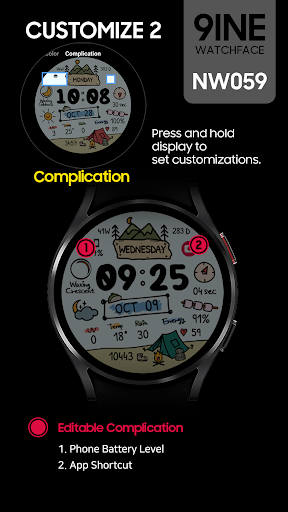


The NW059 Digital watch face made by 9INE
#Watch face installation 1. Install from Companion App (Smartphone) Press the download button on the companion app installed on your smartphone and complete the watch face installation on your watch. 2. Install from App Access the Play store app > Tap to '▼' button > Select the Watch > Tap to price button > Buy If the watch face cannot be installed, please install the watch face through the play Store web browser or watch. 3. Install from web browser Access the Play store web > Tap to price > Select the Watch > Tap to install > Buy 4. Install from watch Open the Play Store on the watch > Search for NW059 > Install ----------------------------------------------------------------------------------------------------------- #Phone Battery Level installation 1. Install the Phone Battery Level app on both the phone and the watch. 2. Select Phone Battery Level in Complications. https://play.google.com/store/apps/details?id=com.weartools.phonebattcomp ----------------------------------------------------------------------------------------------------------- This watch face only supports English. Digital Time (12/24h) Date Battery status Condition of weather Current temperature Chance of Precipitayion Moon Phase Steps Count Heart Rate 10 Colors 4 Preset open app 2 Editable complication Always on Display This watch face supports Wear OS devices.
1 year on Google Play
This app isn't currently appearing in any tracked top charts.