
Auto Level Calc
Updated Aug 18, 2026 · v0.0.22


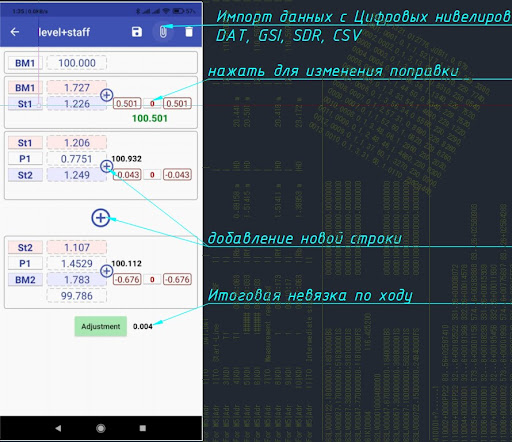


Leveling runs: line & loop adjustment, GSI/SDR/DAT import, CSV export
Your field book, in your pocket. Run leveling calculations and adjustments right at the site. Level and Staff replaces the paper field book and the evening spreadsheet session. Enter readings as you work — the app computes height differences, adjusts the run, and hands you a finished file. ━━━━━━━━━━━━━━━━━━━━ CALCULATION & ADJUSTMENT - Manual and automatic adjustment of measurements - Line adjustment — misclosure distributed across individual staff stations - Loop adjustment for runs that start and end at the same elevation - Maximum permissible error calculation to verify run quality - All values rounded to the nearest millimetre IMPORT FROM DIGITAL LEVELS - Leica — GSI - Sokkia SDL — SDR - Trimble DiNi — DAT - Generic CSV Pull data straight from the instrument instead of retyping it. EXPORT - Detailed report of raw and adjusted elevations - Results saved to a .CSV file YOUR DATA IS SAFE - Automatic saving whenever the app closes, including by accident - Data kept in the level_books folder - Remove a bad row with a long press (1 second) on its height-difference cell SITE CONTEXT - Store GPS coordinates of the project site directly in your notes ━━━━━━━━━━━━━━━━━━━━ COLLIMATION CHECK A built-in calculator for the line-of-sight (i) correction. Fields unlock in sequence — I1, A1, I2, A2 — each one opening only after the previous is filled. No skipped readings, no mixed-up values. The result appears at the bottom of the screen as soon as the last value is entered: x = ((I1 − I2) − (A1 − A2)) / 2 x = ((1270 + 1910) − (1674 + 1520)) / 2 = −7 Corrected reading: A2 + x = 1520 + (−7) = 1513 ━━━━━━━━━━━━━━━━━━━━ TIPS FOR ACCURACY - Rock the staff back and forth and record the lowest reading - Keep backsights and foresights roughly equal in length to cancel out collimation error ━━━━━━━━━━━━━━━━━━━━ VIDEO Walkthrough of entering survey data and adjusting equalization manually: https://youtu.be/4szdeGg3iNM
7 years on Google Play
This app isn't currently appearing in any tracked top charts.