
Slide Control Hub
Updated Dec 7, 2025 · v2.0


Access quick tools such as volume control, screenshots, and network toggles.
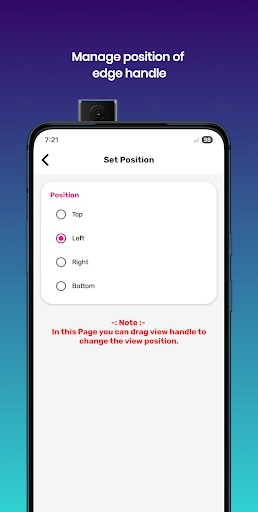
Slide Control Hub brings a clean and customizable quick-access panel to your Android device. Swipe from any edge to open a smart slide panel filled with essential tools, toggles, and shortcuts. Designed for speed, simplicity, and personalization, Slide Control Hub helps you manage daily tasks without interrupting your workflow. Open the hub with a swipe from the top, bottom, left, or right edge and instantly access volume controls, brightness adjustments, connectivity switches, and your favorite apps. The interface is theme-friendly, lightweight, and easy to customize based on your preferred look and feel. ⭐ Key Features • Themes & Wallpapers Choose from modern themes, minimal wallpapers, transparent styles, or apply your home screen background to match the hub interface. • Quick Toggles Access useful settings with one swipe: Wi-Fi, Bluetooth, Flashlight, Location, Airplane Mode, Auto-rotate, and more. • Favorite Apps Shortcut Add your most-used apps to the hub and launch them instantly from any screen. • Useful Quick Tools Reach utilities like calculator, camera, clock, and other handy options right from Slide Control Hub. • Brightness & Volume Sliders Adjust brightness and volume easily without leaving your current app. • Battery Tools Open battery optimization settings directly through the hub. 🎨 Customizable Interface • Adjust the size and sensitivity of the edge swipe area • Choose any edge position: top, bottom, left, or right • Customize edge color and transparency • Rearrange tools, apps, and shortcuts • Modify the layout to match your usage style 🔒 Permissions & Privacy Your privacy is important. Slide Control Hub does not collect or share personal data. • Accessibility Permission Used only for specific global actions like taking screenshots, with your consent. No user data is collected through this service. • QUERY_ALL_PACKAGES Permission Required only to let you select apps you want to add to your favorites list. • Overlay Permission Allows Slide Control Hub to appear over other apps and lets you reposition the panel freely. 📌 Disclaimer All product names and service names mentioned are used only for identification and description. They belong to their respective owners. This app is independently developed and is not affiliated with, endorsed by, or connected to any third-party brands or companies. Slide Control Hub is fast, flexible, and designed to simplify your everyday tasks.
3 years on Google Play
This app isn't currently appearing in any tracked top charts.