
Notein:Handwriting Notes & PDF
Updated Jun 2, 2026 · vv1.3.190.0




Handwrite notes, annotate PDFs, record audio, and think freely on Android.
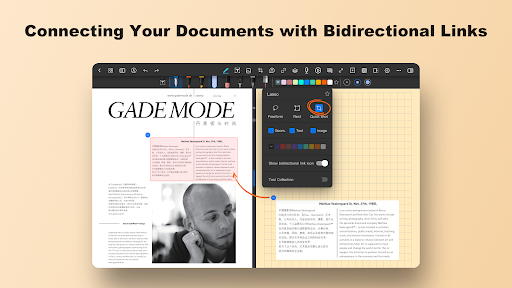
Unleash a new era of note-taking — crafted for Android tablets and stylus users. Whether you’re a student, educator, designer, or professional, this app blends the freedom of handwriting with powerful tools for organizing, annotating, and syncing your ideas. 🖊️ Natural and Precise Handwriting Experience ultra-low latency handwriting with pressure-sensitive brushes that respond just like pen on paper. Perfect for sketching, note-taking, or creating mind maps. Thousands of users call it one of the best handwriting experiences on Android. 🧠 Organize Your Thoughts, Your Way Custom Canvas Options: Choose classic paper sizes or expand ideas freely on an infinite canvas — great for brainstorming and visual thinking. Interactive Linking: Add clickable links between pages to build study guides, planners, or a personal knowledge base. Notebook System: Create, sort, and search notebooks for fast access to all your materials. 📄 Import & Annotate Documents Import and mark up documents in common formats — such as PDFs, images, Word or PowerPoint files. Highlight key points, add comments, draw diagrams, and even merge or split files for custom workflows. 🎨 Layer Support & Creative Tools Use layers to separate handwriting, shapes, and highlights. Redesign without erasing. Create cleaner, more flexible content with ruler-guided pens and shape tools — ideal for diagrams, architecture, and study illustrations. 🔊 Audio Recording + Note Sync Record meetings or lectures while taking notes Tap handwriting to jump to specific moments in the recording Playback tools let you adjust speed, skip silence, or loop key sections for study and review 🤖 AI-Powered Features (available in select regions) Summarize Notes: Let AI extract the main ideas from your writing Auto Outlines: Turn notes into structured outlines instantly OCR + Translation: Convert handwriting or images into editable text, with built-in language translation 🎨 A Workspace That’s Yours Personalize your workspace with custom paper templates, fonts, colors, grids, and stickers. Designed for those who value flexibility and expression. 📐 Precision Graphics Tools Draw diagrams and illustrations with ruler-guided pens and shape tools — ideal for students, architects, or designers. ☁️ Cloud Sync Sync your notes across devices using Google Drive or OneDrive. Your notebooks are always backed up and accessible — anytime, anywhere. 🚀 Don’t just take notes. Create, explore, and think freely with powerful tools designed for your Android tablet and stylus. Download Notein today and bring your ideas to life.
3 years on Google Play
This app isn't currently appearing in any tracked top charts.