
PDF Text Remover
Updated Jul 31, 2026 · v2.2.2


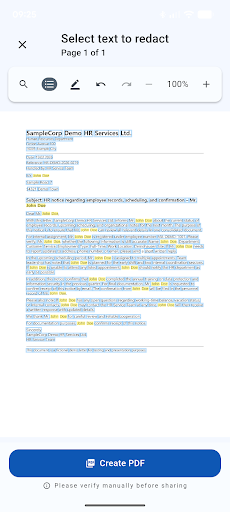
Securely remove PDF text — local, offline & ready to share
🛡️ PDF Text Remover – securely remove sensitive content before sharing documents Before sharing documents with other people, organizations or AI chatbots, sensitive information should be removed. PDF Text Remover is built for exactly this purpose: Confidential content is permanently removed from documents, not just visually covered. Everything happens locally on your smartphone. No uploads, no cloud, no external servers. The app works completely offline. Perfect for contracts, invoices, applications, bank statements, scans, and photos. ✅ Local processing on your device ✅ No uploads, no cloud access ✅ Redacted content cannot be restored ━━━━━━━━━━━━━━━━━━━━━━━━━━━━━━ 📱 Two workflows – full control over your data 🔍 Search document (text-based PDFs) For PDFs with selectable text: • Manual text search with custom keywords • Multiple search passes per document • Save and reuse custom search patterns • Results list with enable / disable per match • Text is physically removed from the PDF • Automatic removal of hidden metadata 📷 Mark document (OCR workflow) For scans, photos, and image-based PDFs: 🧠 Integrated OCR text recognition ✏️ Interactive editing: 🔍 Text search 👆 Tap detected text areas 🖌️ Freehand marking of any region 🖤 Redactions are rendered directly into the image 📄 Export as a secure PDF with no hidden original content ━━━━━━━━━━━━━━━━━━━━━━━━━━━━━━ 🔎 Smart search & patterns • Case-insensitive search • Fuzzy matching to compensate OCR errors • Multi-word search for connected terms • Full Unicode support • Search patterns usable in both workflows • Clear results list with page navigation ━━━━━━━━━━━━━━━━━━━━━━━━━━━━━━ 🌍 Multilingual – UI & text recognition User interface and text recognition always use the same language. ━━━━━━━━━━━━━━━━━━━━━━━━━━━━━━ 📂 Import & export Input formats: 📄 PDF · 🖼️ JPG, JPEG, PNG · 📝 Word · 📊 Excel · 📷 Camera · 🔗 Share from apps Output: ✅ Always PDF 🔐 Permanently cleaned – no hidden original text ━━━━━━━━━━━━━━━━━━━━━━━━━━━━━━ 🔒 Local. Offline. Under your control. • All processing happens on your device • No internet required • No data collection • Content is removed, not just covered ━━━━━━━━━━━━━━━━━━━━━━━━━━━━━━ 🚀 How it works 1️⃣ Load a document 2️⃣ Search text or mark areas 3️⃣ Review and adjust results 4️⃣ Export securely – done 👉 Download PDF Text Remover now and remove sensitive content with confidence. 🔑 Keywords: redact PDF, remove PDF text, delete sensitive data, OCR text recognition, clean documents, PDF redaction, offline PDF editor, safe sharing with AI
0 years on Google Play
This app isn't currently appearing in any tracked top charts.