
Remove Pages from PDF
Updated May 4, 2026 · v1.0.7




Delete PDF Pages, Merge, Split, Lock, Rotate, and Convert. All-in-one PDF Tools
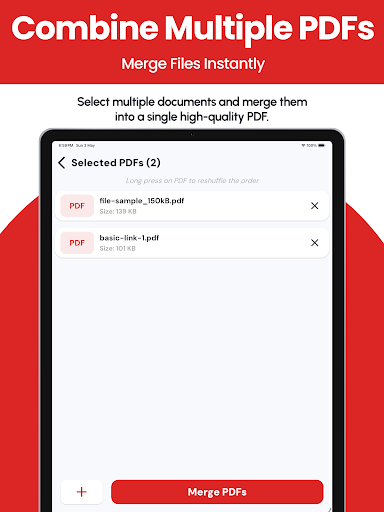
Are you looking to delete PDF pages easily? "Remove Pages from PDF" offers a highly efficient solution to refine your PDF documents by allowing you to remove unwanted pages, whether they are single or multiple. This app is the perfect tool for anyone needing a quick and reliable way to delete pages from PDFs directly on their Android device. Key Features of Remove PDF Pages Application Effortless PDF Page Removal: Directly remove pages from PDF documents with just a few taps, whether you need to delete a single page or multiple pages. Merge & Combine: Join multiple PDF reports, invoices, or projects into a single file in seconds. Smart Splitter: Extract exactly what you need by splitting PDFs into individual pages or specific ranges. Organize & Reorder: Drag-and-drop pages to fix order issues or rotate scanned documents for the perfect view. Advanced Security: Protect your privacy by adding passwords to sensitive files or removing restrictions for easier access. Professional Link Stripper: Automatically identify and remove clickable hyperlinks for a cleaner, distraction-free document. High-Speed Conversion: Seamlessly turn photos into professional PDFs or export PDF pages as high-quality PNG/JPG images. Quick Management: Never lose a file again. Our Recent Files history lets you share, rename, or export your work instantly. User-Friendly Interface: Navigate through a simple, intuitive interface that makes deleting PDF pages a breeze. Preview Options: Ensure accuracy before finalizing the document by previewing PDFs both before and after you delete pages. Wide Compatibility: Supports a range of PDF versions and maintains the quality and formatting of your original files. Share and Save: Easily save your modified PDFs and share them directly from the app via email, cloud services, or any other method. Why 'Remove Pages from PDF'? Deleting unnecessary pages from PDFs helps to focus important content and manage your files more efficiently. Whether you're a professional looking to prepare concise reports, a student who needs to organize study materials, or anyone else in need of streamlined document management, "Remove Pages from PDF" is designed to enhance your productivity and save you time. Perfect for Various Users Students: Delete single page sections or multiple pages from lengthy PDFs to focus on key study materials. Professionals: Create precise business documents by removing irrelevant pages before presentations or submissions. Educators: Tailor teaching materials by deleting unnecessary pages from educational PDFs. Legal Professionals: Efficiently manage extensive legal documents by removing extraneous pages. General Users: Keep your PDFs neat and relevant by deleting pages that are no longer needed. How Remove PDF Pages App Works Select Your PDF: Open the app and choose the PDF from which you want to delete pages. Choose Pages: Whether you need to delete a single page or multiple pages, simply select them with ease. Preview and Adjust: Use our preview feature to check the selected pages before you delete them from the PDF. Delete Pages: Confirm your selections and delete the pages with just one click. Save and Share: Save your updated PDF to your device or share it immediately via your preferred method. Advantages of 'Remove Pages from PDF' Boosted Productivity: Simplify document management to focus more on your core tasks. Reduced Storage Space: Smaller file sizes mean more space on your device. Environmentally Friendly: Less need for printing saves paper, making your work process greener. Cost-Effective: Avoid the need for expensive PDF editing tools with our all-in-one page removal solution. Download Remove Pages from PDF Today! Join thousands of users who trust 'Remove Pages from PDF' to manage their digital documents effectively. Download our app now and experience the easiest way to delete PDF pages!
2 years on Google Play
This app isn't currently appearing in any tracked top charts.