
Penly: Digital Planner & Notes
Updated May 5, 2026 · v1.23.18




Note-taking, PDF Editor, Digital Planner, PDF annotation, notebook & journal.
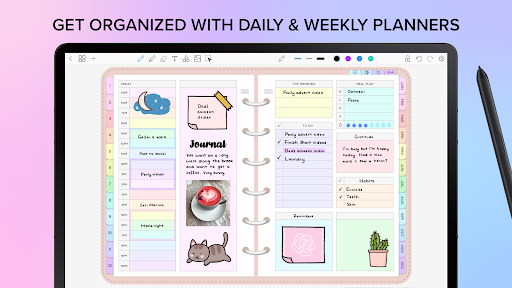
🖋️ Unlock your creativity and boost your productivity with Penly — your all-in-one digital planner, journal, and note-taking app. • Simple, intuitive interface • Smooth handwriting and smart eraser • Text, image, and shape tools • Create sticker collections • Import custom fonts • Automatic handwriting to text • Highlight & underline • Transform, group, and lock objects • Undo & redo your actions 📚 DIGITAL PLANNERS INCLUDED • Four digital planners included • Hyperlinked monthly, weekly and daily pages • Undated & reusable: write in the dates yourself • Landscape and portrait • Rainbow and black minimal styles • To do list and note templates included ⬇️ IMPORT PDF FILES & PLANNERS • Any PDF file can be imported into the app • Navigate PDF files using existing hyperlinks • Export your file as an editable Penly file or as PDF 🔗 CREATE HYPERLINKS • Create your own hyperlinks in any document • Turn any object into a hyperlink • Hyperlink to pages or websites 🖼️ STICKER & IMAGE TOOLS • Use the collections tool to organize your stickers • Bulk import stickers in one go • Save notes and drawings to collections for quick reuse • Edit and rearrange items • Favorite collections for faster access • Mirror, flip, crop and adjust image opacity 📂 ORGANIZE PAGES AND DOCUMENTS • Organize your notes: copy, paste, delete and rearrange pages • Manage your documents with folders and sub-folders • Documents reopen right where you left off 🔄 SYNC BETWEEN ANDROID DEVICES • Link Google Drive to Penly to enable syncing • Sync manually, or whenever app is opened/closed 🌐 LANGUAGE English language support only 💸 PURCHASE & REFUND One-time payment for full access to app. We offer refunds for any reason within 7 days. Email us via "support@penly.net" with the email you used to make the purchase. We aim to respond within 2 working days. 💬 JOIN OUR FACEBOOK COMMUNITY https://www.facebook.com/groups/penlyapp ℹ️ WATCH TIPS & TUTORIALS https://www.youtube.com/channel/UCXAN8dqXktM26YzEH_9LSEQ https://www.instagram.com/penly.app 📧 Contact me at: support@penly.net (For issues, please include app version and device name) ⭐ Like Penly app? Please leave a 5 star review! ⭐
4 years on Google Play
This app isn't currently appearing in any tracked top charts.