
EVA System Monitor
Updated Jun 1, 2026 · v2.6


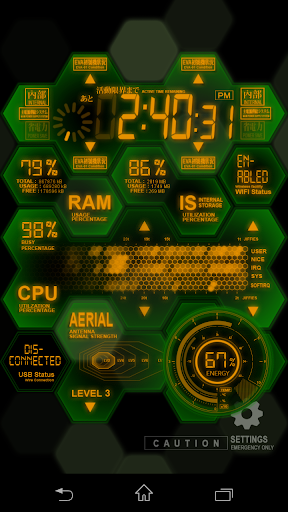


Unique NERV style, comprehensive monitoring, transform your device experience.
Experience the perfect blend of technology and anime artistry, transforming your device into a high-tech monitoring center with unique visual effects and comprehensive system monitoring. Our application combines exquisite NERV-style animations with practical system monitoring tools to offer a one-of-a-kind user experience. Features of the EVA System Monitor include: - System Clock - RAM usage - Internal storage usage - Wi-Fi status - CPU and network statistics (not supported on Android 8 or newer versions) - Network Usage - Visualized audio output - USB status - Mobile network signal strength - Remaining battery power and temperature Additionally, it includes a SH-06D NERV MAGI Home animation designed specifically for the lock screen, and supports the Android TV platform (Android TV version cannot use the wallpaper function, but can be set as a screensaver), bringing the charm of a NERV high-tech monitoring center to your large screen. Whether you are a tech enthusiast or an anime fan, our application will bring an extraordinary visual feast and practical system monitoring functionality to your device. With this app, your device will be more than just an ordinary tool; it will be your personalized piece of tech art. From your phone to your home's Android TV, our application will bring new life and style to each of your devices. 📺 Special Note for TV Users: 1. The app is designed to elevate your device's aesthetic, but it is important to note that on Android TV and Google TV, the app functions solely as a Screensaver. It cannot be set as a Live Wallpaper due to platform restrictions. 2. Setting Screensaver on Google TV: Google TV users, we understand that customizing your screensaver settings through the standard UI is currently not an option. However, there's a workaround for tech-savvy users who are comfortable with using ADB commands. You can set the app as your screensaver by executing the following ADB command: "adb shell settings put secure screensaver_components com.phardera.evasysmon/com.phardera.lwplib.livewallpaper.UnityDaydreamService"
13 years on Google Play
This app isn't currently appearing in any tracked top charts.