
Heart Rate Sentinel
Updated Jul 22, 2026 · vVARY


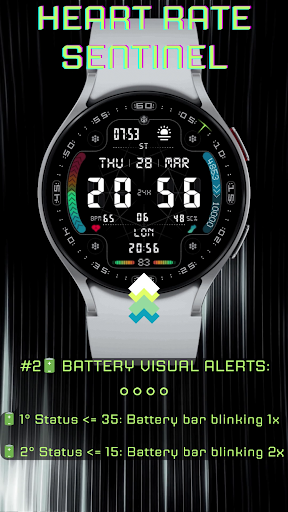


Sportive watchface with Visual Alert on Heart Rate and Health for Wear OS
FEATURES: ❣️ Heart Rate BPM VISUAL ALERT, to remind you BPM too high or too low: 💛 BPM above105: HR bar blinking 1 time per second 🧡 BPM above 140: HR bar blinking 2 times per second 🔥 BPM above 185: Time digits and HR progress bar blinking 2 time per second, red animated notification on display 💙 BPM below of 45: Time digits and HR progress bar blinking 1 time per second, blue animated notification on display 🚶Steps progress bar with Partial over Total Steps Goal(e.g. 3615 of 10000) and counter with % of Total Steps Goal (e.g. 34%). Only for MOBVOI (TicWatch) USERS with Wear OS: 3.5 and TicHealth: 5.0.0-3176.2442: PLEASE NOTE at this moment Total Steps Goal can't synch with TicHealth App and it will show instead a default value of 6000 steps as Total Steps Goal. Hopefully, could be be fixed in a next update from Mobvoi. 2 Editable Complication, Optimized for 🌦️Weather Info and 🌍 World Clock (however, you can choose any other complication available on your device based on Icon + Short Text) 3 Main Color Themes (White, Lime, Blue) and 2 Backgrounds (1 graphical and 1 empty with circular seconds dots ) with 30 possible color combinations of elements (White, Lime, Blue, Red) for each background 🔋 Battery Bar below/equal 35%: blinking 1 times per second 🔋 Battery Bar below/equal 15%: blinking 2 times per second 🔗 🔗 🔗 🔗 4 Shortcut to an app of your choice 🗓️ Calendar, DST/ST indicator Automatic 12H/24H Blinking time dots Seconds with graphic indicator rotating SUPPORTED DEVICES: All smartwatches with round display and Wear OS 3.5/4 (API 30+) 📝 INSTALLATION NOTES: This watch face is intended for smartwatches with round display and Wear OS 3/4 (API 30+). The mobile app only serves as a placeholder to make it easier to set up and find the watch face on your Wear OS watch. Other than install the watch face from the app, you can simply select your watch device from the Install drop-down menu and wait for Google Play to install on your watch. In case you're having issues with custom complications after recent update, consider full watch face reinstall. Please send any problem reports or requests for help to our support address: quantum.bit.time@gmail.com Follow us on our socials: Facebook https://www.facebook.com/people/QuBit-Time/61552532799958/ Instagram https://www.instagram.com/qubit.time/ Telegram https://t.me/QuBitTime_QA
2 years on Google Play
This app isn't currently appearing in any tracked top charts.