
Podcast Video Clips by Podvio
Updated Mar 27, 2026 · v2.0.3




Turn Podcasts into Engaging Videos with Captions, Podcast Video, Podcast Preview
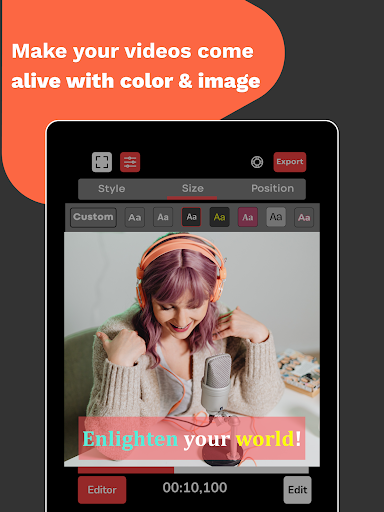
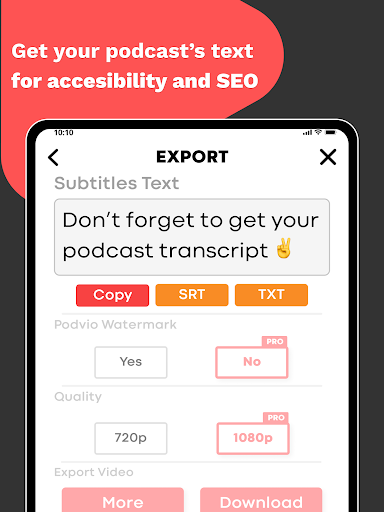
Elevate your favorite podcasts to a new level with Podvio, the ultimate app that effortlessly turns them into engaging videos! With just a few taps, you can unleash your creativity by adding captions, images, and much more, creating content that captivates your audience. Say goodbye to the complexities of video editing – Podvio simplifies it all for you. Key Features: - Easy Podcast-to-Video Conversion: Transform your podcasts into visually stunning videos in seconds. Our seamless conversion process ensures a high-quality video output, perfect for sharing across social media and various platforms. - Customizable Video Backgrounds: Add more depth to your videos by setting a dynamic video or a static image as the background of your podcast, enhancing the visual appeal of your content. - Flexible Video Aspect Ratios: Cater to different platforms with ease, as Podvio supports various video output ratios including 1:1, 4:3, and 16:9, ensuring your content fits perfectly wherever it's shared. - Interactive Image and Video Editing: Gain full control over the visual elements in your videos. Easily scroll, zoom in, and zoom out of any added image or video to focus on what matters most in your content. - Auto-generated Captions: Make your videos more accessible and engaging with auto-generated captions. Our advanced AI technology provides accurate and synchronized captions for a seamless viewing experience. - Customizable Caption Styles: Tailor your captions to match your brand's aesthetic or personal taste. Choose from a variety of styles, sizes, and positions to make your videos uniquely yours. - Export Transcripts & Captions: Need a transcript of your podcast? Export it as an SRT or TXT file with ease, or copy it directly to your clipboard. Pro Features: + Generate auto-captions. + Export captions as .srt or .txt files. + Create unlimited projects. + Choose a background image or video. + Select a background color. + Personalize auto-captions with custom colors, sizes, and fonts. + Change video aspect ratios to 1:1, 4:3, 16:9 + Download in 4K Why Turn Podcasts into Videos? * Broader Reach: Videos can reach a wider audience and are more easily discoverable on social media and other video-sharing platforms. * Enhanced Engagement: Provide a more immersive and interactive experience, allowing audiences to see as well as hear your content. * Monetization Opportunities: Videos open up more avenues for advertising and sponsorships. * Increased Accessibility: Include captions for a wider audience reach, including those with hearing impairments. * Improved Storytelling: Use visual elements to complement your audio for more engaging and memorable content. Trial and Subscription Details: Enjoy all Pro features during the free trial period. Post-trial, if the subscription isn’t cancelled, charges will be applied by Google Play. Subscriptions automatically renew unless cancelled. For more information or assistance, contact us at hello@podvio.app.
3 years on Google Play
This app isn't currently appearing in any tracked top charts.