
4D Red Icon Pack
Updated Aug 8, 2026 · v7.6


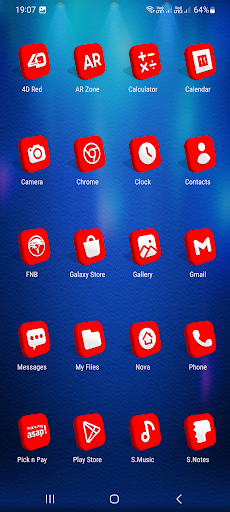
Beautiful 4D Icons for mobile phones and tablets
Note: It takes at least 30 minutes to design each icon therefore I started with system apps and a few popular apps. I will update as often as possible. One UI Launcher (Samsung default launcher) is supported using Theme Park. IMPORTANT: You need a Custom Launcher to use this app (Supported Launchers are Listed Below), I recommend Nova Launcher. Install Notes: • Install and open the app. • Tap on 'Apply' select your installed launcher or apply via your custom launcher, Done. • Navigate to app drawer to preview icons, wallpaper, icon request, faqs and app settings. Features: • 200+ Icons • Icon Request • Analog Clock (Widget) • 31 Dynamic Calendars • Wallpaper save location • App Light and Dark theme • FAQs with search function • Option To Bookmark Icons • Option To Search Wallpapers • 478 Live and Static Wallpapers • Icon previews with search function • Localization: Supports 19 languages • Quick apply for your default launcher • Regular & Premium Icon Request Options • Firebase Cloud Messaging (Update Notifications) • Supports 42 launchers, there probably be more supported launchers which I haven't tested yet. Compatible with the following Launchers: Action, ADW, Apex, Blackberry, CM Theme Engine, Flick, GO, Holo, Holo HD, Hyperion, Kiss, Lawnchair, Lg Home, Lucid, Microsoft, Neo, Niagara, Nougat, Nova, One UI, Pixel, Poco, Posidon, Smart , Solo, Square & ZenUI. Fully Compatible but not Included in Apply Section: Apply via your Launcher ABC, Arrow, ASAP, Apolo, Atom, Aviate, Cobo, Computer Launcher Win 10 Gold, Evie, GO-EX, Launch by Quixey Launcher, Line, M, Mesh, Mini, Next, Novel, Open, Peek, V, Windows Launcher X Prime, Z & Zero. N.B: I have tested on the above launchers, there might be more supported launchers which hasn't been tested yet. How To Change Icons Manually: 1.Tap and Hold down on the icon then release it, then a small pop-up will appear. 2.It will allow you to change the icon and the name. 3.Select the icon, this will show your icon packs, select 4D Red and choose your icon (Built-in Search Feature within the App), select it then tap Done. Youtube tutorial: https://www.youtube.com/watch?v=meRNXf0QB9A
9 years on Google Play
This app isn't currently appearing in any tracked top charts.