
FlowSavvy: AI Schedule Planner
Updated Jul 22, 2026 · v3.14


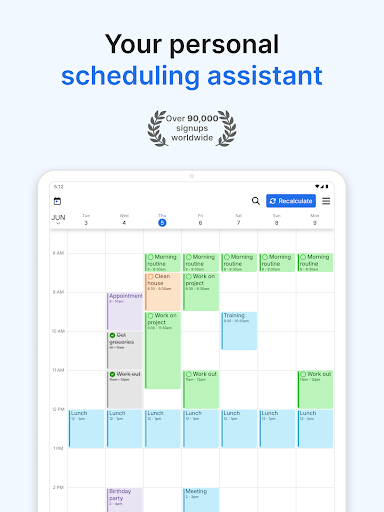


AI task scheduler for automated time blocking and daily planning
** FlowSavvy is free forever, with the option to upgrade to FlowSavvy Pro (see https://flowsavvy.app/pricing to compare). ** Requires internet connection FlowSavvy is an AI Schedule that intelligently plans tasks from your to-do list into your schedule so you can see exactly what needs to get done and when. Advanced auto-scheduling: - Automatically split tasks when they don’t fit in your schedule - Automatically balance your workload over multiple days - Automatically rebuild your schedule whenever you make a change (no more manually shifting all your time blocks!) - 1-click recalculate your entire schedule when you get behind - Generate optimized time blocks from your to do list up to 8 weeks ahead - Customizable auto-scheduling settings so FlowSavvy plans how you plan - Customizable scheduling hours (Work hours, Personal hours, etc.) Task/Event features: - Set due dates and durations and have FlowSavvy decide where to schedule them or fix them to a specific time - Repeating events and tasks (<-- flexible habits!!) - Partial completes and progress tracking - Complete tasks directly from the calendar - Tasks color coded by how close they are scheduled to their due date (green, orange, red) - All day events and busy/free events Other features: - Push notification reminders - Sync with Google Calendar, iCloud, and Outlook - Multiple calendar views and to-do list views - Unlimited events, tasks, and calendars - Quick capture tasks in the inbox, schedule them later - Dark mode and custom colors for events and tasks This is weekly planning like you've never seen before. Download FlowSavvy now and experience automatic time blocking!
4 years on Google Play
This app isn't currently appearing in any tracked top charts.