
CBZ/CBR Viewer: Comic Reader
Updated Aug 21, 2026 · v0.0.9




CBZ & CBR Comic Reader with Statistics, Favorites, and Color Correction.
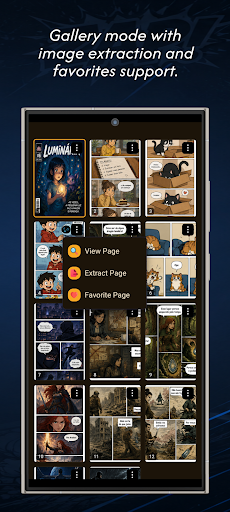
Read comics, manga, and digital graphic novels in CBZ and CBR files with a fast, modern reader. Organize your collection in a smart library, track detailed reading statistics, and enjoy advanced features such as color correction, page favorites, zoom, page extraction, keep screen on, and multiple reading modes. No account creation, sign-up, or subscription is required. Just add your files and start reading. 📚 Compatible with CBZ and CBR Open and read CBZ and CBR files directly on your device. The app is designed to provide a comfortable reading experience for manga, comics, webcomics, and graphic novels, whether you have a small or large collection. 🗂️ Smart Library Manage your comic collection with a modern and organized library. Available features: • Grid view • List view • Thumbnail covers • Quick title search • Sorting by different criteria • Recently added comics • Recently read comics • Alphabetical sorting • Sorting by reading progress • File size and page count information Quickly find your favorite comics and continue exactly where you left off. 📊 Detailed Reading Statistics Track your progress and discover your reading habits with comprehensive statistics. View information such as: • Total reading time • Number of comics in your library • Total pages read • Favorite pages • Reading progress • Reading streak • Personal records • Activity calendar • Monthly statistics • Yearly statistics Make your reading experience even more engaging by tracking your progress over time. 🎨 Color Correction and Adjustment Enjoy advanced features commonly found only in premium apps. Color correction helps improve the display of: • Black-and-white manga • Scanned comics • Very dark pages • Low-contrast images • Different art and scanning styles Read more comfortably and adjust the display to your preferences. ❤️ Page Favorites Bookmark specific pages and return to them whenever you want. Perfect for: • Saving memorable scenes • Keeping favorite covers • Creating drawing references • Revisiting important pages • Returning to moments you want to reread 📖 Multiple Reading Modes Choose the reading style that works best for you. Available modes: • Page-by-page reading • Continuous vertical scrolling • Horizontal scrolling • Fast page navigation • Automatic reading resume • Gesture zoom Read your comics the way you prefer. 📦 Page Extraction Extract individual pages from CBZ and CBR files whenever you need to access or share separate images. 🌙 Personalization and Comfort Customize your reading experience according to your preferences. Includes: • Light theme • Dark theme • Black theme • Sepia theme • Keep screen on while reading • Language settings Overview: ✅ Full support for CBZ and CBR formats ✅ Smart library for organizing your collection ✅ Detailed reading statistics ✅ Color correction and adjustment ✅ Page favorites ✅ Quick search and advanced sorting ✅ Page extraction ✅ Zoom and multiple reading modes ✅ Keep screen on while reading ✅ No account creation required If you're looking for a CBZ and CBR comic reader, a manga reader, a comic reader, or an app to organize and track your digital collection, this app provides a complete, modern, and feature-rich experience for enjoying your favorite comics, manga, and graphic novels.
0 years on Google Play
This app isn't currently appearing in any tracked top charts.