
SlideLynk: Presentation Remote
Updated Jul 24, 2026 · v1.3.0


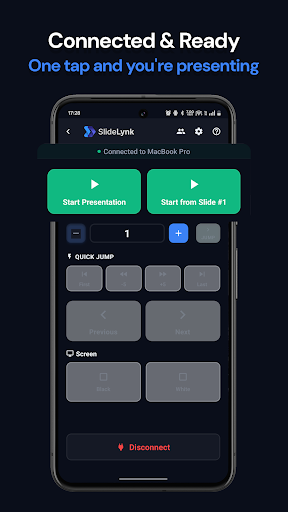


Control PowerPoint & Keynote presentations wirelessly from your phone.
SlideLynk turns your phone — and your Wear OS smartwatch — into a wireless presentation remote 🎯 Connect to your desktop over WiFi and control PowerPoint or Keynote from anywhere in the room. No dongles, no Bluetooth, no line-of-sight needed. Free to start — upgrade to SlideLynk Pro when you need more. 🆓 FREE TO START • 2 presentation sessions per day (60 minutes each) • Connect to 1 saved computer • QR code and auto-discovery connection • Manual IP for corporate and restricted networks • Basic slide navigation — next, previous, start, and stop • Live slide counter and progress bar ⌚ WEAR OS SMARTWATCH (SLIDELYNK PRO) Control your presentation without touching your phone: • Next/Previous slide right from your wrist • Start & stop presentations • See current slide number in real time • Browse & connect to servers from the watch • Saved passwords sync automatically • Works with Pixel Watch, Galaxy Watch 4+ & all Wear OS 3+ watches 📱 PRESENTATION CONTROL Free tier: • Next/Previous slide with large, easy-to-tap buttons • Start, stop & resume presentations remotely • Live slide counter & progress bar • Quick navigation (+/− 5 slides) SlideLynk Pro: • Jump to any slide number instantly • Blank or white the screen for audience focus • Volume button control — navigate slides with hardware buttons • Unlimited sessions with no time limits • Unlimited saved servers 🔗 CONNECT IN SECONDS • QR code — scan and connect in one tap • Auto-discovery — finds your desktop instantly • Manual IP — works on corporate & restricted networks • Mobile hotspot — present anywhere, even without WiFi • Saved servers with real-time online/offline status ⚡ SLIDELYNK PRO (ANNUAL SUBSCRIPTION) Upgrade for advanced presenter tools: • 🔊 Volume button slide control • ⌚ Wear OS smartwatch control • 🎯 Jump to specific slide • 🖥️ Screen blanking (black/white) • 💾 Unlimited saved servers & unlimited sessions • 🔒 Password-protected access & access control • 👥 Team sharing — share Pro with 2 teammates • Free trial may be available when offered by Google Play 👥 TEAM SHARING (INCLUDED WITH PRO) Share Pro with up to 2 teammates, colleagues, or students: • Invite via code, QR, or shareable link • Team members unlock all Pro features at no extra cost • Manage members & remove access anytime • Real-time notifications for all team activity 🔒 PRIVACY & SECURITY • All presentation control stays on your local network • No presentation data sent to external servers for slide control • Password-protected server connections (Pro) • Sign in with Google or Apple for Pro, teams, and subscription sync • Delete your account & data anytime 💻 WORKS WITH • Microsoft PowerPoint (Windows & macOS) • Apple Keynote (macOS) • Free desktop app for Windows, macOS & Linux ✨ BUILT FOR PRESENTERS • Clean, distraction-free interface • 🌙 Dark & light themes • 📳 Haptic feedback confirms every action • Screen stays awake during presentations • Works on phones, tablets & Wear OS smartwatches • Multiple phones can connect to the same presentation 📞 SUPPORT • In-app help center with 25+ articles & FAQ • Interactive onboarding tour • Email: support@slidelynk.com Perfect for teachers, students, business professionals & speakers 🎤 Download the free desktop app at slidelynk.com/download to get started. --- Privacy Policy: https://slidelynk.com/privacy Terms of Use: https://slidelynk.com/terms
0 years on Google Play
This app isn't currently appearing in any tracked top charts.