
Aruk: TV Remote
Updated Aug 29, 2026 · v1.4.3


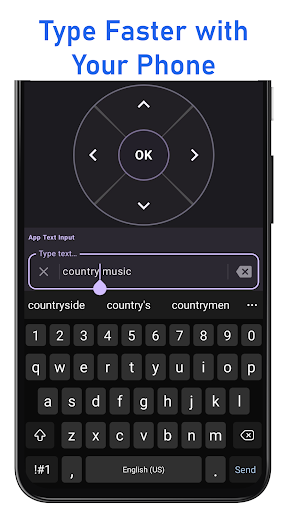


Compatible with Roku TVs and players. Keyboard, voice search & volume control.
Looking for a Roku TV remote on your Android phone? Aruk is a third-party Roku remote control app for Roku TVs and streaming players. Use WiFi to navigate your device, type with your phone keyboard, search by voice, control volume, launch channels, and create custom Quick Actions. Connect your phone and compatible Roku device to the same WiFi network for fast and convenient control. Aruk is designed for simple setup and everyday TV control, giving you the essential remote features you need without the clutter. 🚀 Fast WiFi Device Discovery & Auto Connect • Automatically detects compatible devices on your WiFi network • Quickly reconnects to your last used device • Real-time connection status monitoring • Optimized discovery for fast and reliable pairing No complicated setup. Connect your phone to the same WiFi network as your TV or streaming device and start controlling it. 🎮 Smooth & Responsive Remote Control Enjoy a clean and responsive remote experience for everyday TV navigation. • Classic D-Pad and Touchpad navigation modes • Power, Mute, and Volume controls • Play/Pause, Rewind, Fast Forward, and Instant Replay • Find and reconnect to previously paired devices • Haptic feedback for better interaction ⌨️ Smart Keyboard & Voice Search Type faster and search more easily using your Android phone. • Fast text input for supported apps and search fields • Smart text handling for passwords and longer input • Search suggestions and input history • Built-in voice search for convenient content discovery ⚡ Apps & Quick Actions Launch installed channels and automate common actions with one tap. • View and launch installed channels • Create custom Quick Actions for repeated tasks • Combine multiple commands into a single action Example: Launch YouTube → Wait → Search → Play Save time by combining multiple steps into one convenient action. 💤 Sleep Timer Set your TV to automatically turn off after a selected time using preset or custom timers. 📟 Home Screen Widget (PRO) Control power, volume, and navigation directly from your Android home screen for faster access. 🌎 Compatibility Aruk works with compatible Roku TVs and Roku streaming devices connected to the same WiFi network, including devices from: • TCL • Hisense • onn. • Sharp • Philips • Insignia • Element • Westinghouse Compatibility may vary by TV or streaming device model. 📦 Lightweight & Fast • Small app size of approximately 5 MB • Fast startup and responsive performance • Lightweight design focused on essential remote features 💎 Optional PRO Upgrade – One-Time Purchase • Removes ads • Unlimited keyboard usage • Unlimited Quick Actions • Home screen widget access No subscription. One purchase, yours forever. Download Aruk and use your Android phone as a convenient remote for compatible Roku TVs and Roku streaming devices. Trademark Disclaimer Aruk is an independent third-party application. It is not affiliated with, sponsored by, endorsed by, or otherwise associated with Roku, Inc. Roku is a trademark of Roku, Inc.
0 years on Google Play
This app isn't currently appearing in any tracked top charts.