
Sony Tv Remote - IR & Wi-Fi
Updated Jul 25, 2026 · v12.1

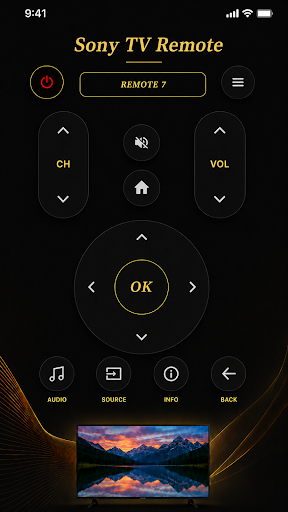
Control Sony Smart TV via IR & Wi-Fi from your phone easily remote app
# Sony Smart TV Remote – IR & Wi-Fi Control Transform your smartphone into a powerful remote control for your Sony Smart TV. Whether your device has an IR blaster or you prefer controlling your TV over Wi-Fi, Sony Smart TV Remote provides a simple, fast, and reliable way to manage your entertainment experience. No need to search for your physical remote anymore. Control power, volume, channels, navigation, and more directly from your phone. ## Key Features ### Dual Connection Modes **IR Remote Control** * Works with phones that have a built-in IR blaster. * Control your Sony TV instantly without internet. * Simply point your phone at the TV and use it like a traditional remote. **Wi-Fi Smart Control** * Connect your phone and Sony Smart TV to the same Wi-Fi network. * Easy pairing with an on-screen code. * Control your TV from anywhere in your home without needing direct line of sight. ### Complete TV Control * Power On/Off * Volume Control * Channel Control * Mute Function * Home Button * Back Button * Source/Input Selection * Audio Settings * Information Button * Smart Navigation Pad (D-Pad) * OK/Enter Button ### Number Pad Support Quickly switch channels using the built-in numeric keypad. Enter channel numbers directly for faster access to your favorite content. ### Smart Navigation Navigate menus, settings, apps, and streaming services with an intuitive directional control pad designed for smooth operation. ### Multiple Remote Profiles Choose the remote layout that best matches your Sony TV model. Your selected remote is automatically saved for future use. ### Fast & Easy Setup 1. Launch the app. 2. Select your Sony TV remote model. 3. Choose IR or Wi-Fi connection. 4. Start controlling your TV instantly. ## Why Choose Sony Smart TV Remote? ✓ Clean and modern interface ✓ Fast response time ✓ Supports IR and Wi-Fi control ✓ Easy TV pairing process ✓ Lightweight and user-friendly ✓ No additional hardware required ## Wi-Fi Pairing Instructions 1. Connect your phone and Sony TV to the same Wi-Fi network. 2. Open the app and scan for available TVs. 3. Select your TV from the device list. 4. Enter the pairing code displayed on your TV. 5. Enjoy full wireless control. ## Important Notes * IR mode requires a smartphone equipped with an IR blaster. * Wi-Fi mode requires your phone and TV to be connected to the same network during pairing. * Some features may vary depending on your TV model. Download Sony Smart TV Remote today and enjoy a smarter, more convenient way to control your television.
0 years on Google Play
This app isn't currently appearing in any tracked top charts.