
Bangkero Dive-Master
Updated Mar 11, 2026 · v1.2.0


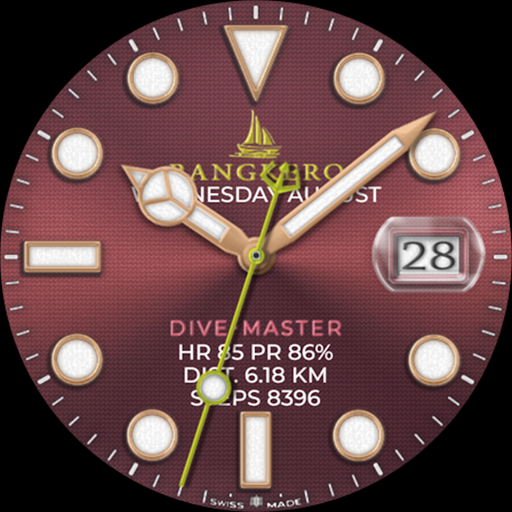


Bangkero the waves explorer is now on WEAROS
Explorer of the waves, the Bangkero Dive-Master is a watch face for any Wear OS watch with Wear OS version 4 (API 33+) or higher. Examples are Samsung Galaxy Watch 5, 6, 7, 8, Pixel Watch 2, etc. This watch face was designed using Watch Face Studio tool. A "bangkero" is a Filipino (Philippines) term for a skilled boatman, referring to someone who operates a "banga," or boat, to provide transportation, especially by guiding tourists on thrilling rides through rapids. ✰ Features: - Analog dial for time - Date mirror/cyclops lens magnify effect on dial hands - Heart rate, steps, distance (in km) and battery information - Customization (dial background, index and dial hands colors) - Month, day of the week and day display - 4 preset app shortcut (heart rate, battery, steps and calendar) - 7 custom shortcuts to access your favorite widget - Always on display lumen color and brightness options INSTALLATION: 1. Make sure your watch is connected to your smartphone (Bluetooth) with same GOOGLE account. 2. In Play Store App, select your watch as targeted device for installation. The watch face will be installed on your watch. 3. After installation, if your active watch face is not replaced. Follow these 3 SIMPLE STEPS before you comment not working. 3.1- Long press on your current watch face --> swipe to right until --> "Add watch face" (+/plus sign) 3.2- Scroll down and look for "Downloaded" section 3.3- Search and click on your new watch face to activate it - and that's it! SETTING UP SHORTCUTS/BUTTONS: 1. Press and hold the watch display. 2. Tap customize button. 3. Swipe from right to left until you reach the "complications". 4. The 7 shortcuts are highlighted. Click on it to set what you want. CUSTOMIZATION OF DIAL STYLE e.g. BACKGROUND, INDEX ETC: 1. Press and hold display then hit "Customize". 2. Swipe left and right to choose what to customize. E.g. Background, Index frame etc. 3. Swipe up and down to choose options available. For bugs, comments or suggestions, don't hesitate to contact me at (sprakenturn@gmail.com). If you like this watch face hope you wouldn't mind leaving a review. Thanks for your support!
3 years on Google Play
This app isn't currently appearing in any tracked top charts.