
Step Counter - Pedometer
Updated Jun 8, 2026 · v1.0.4

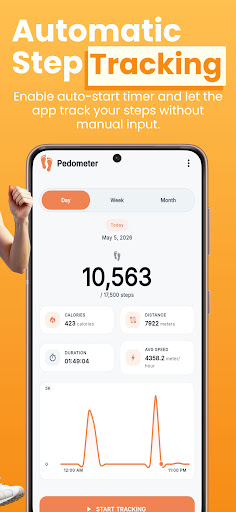


Track steps, calories, distance & walking progress with smart reminders.
Step Counter - Pedometer helps you track your daily steps, walking distance, calories burned, activity time, and progress toward your daily goal with a simple and easy-to-use step tracker. Whether you walk for fitness, daily movement, weight control, or a healthier routine, this pedometer gives you a clear view of your activity without complicated setup. 🚶 Track Your Daily Steps Use your phone to count steps and monitor your daily walking activity. The app shows your step count, distance, calories, duration, and average speed in one clean dashboard. You can check your progress anytime and see how close you are to your daily step goal. 🎯 Set Your Daily Step Goal Choose a daily walking goal that fits your routine. You can select a preset goal or adjust your own target. Your goal helps you stay focused during the day, whether you want to walk more, build a simple fitness habit, or stay active between work and rest. ⏱️ Manual & Automatic Tracking The app gives you two tracking options: • Recommended Mode — manually start and stop step tracking when you want to record activity. • Automatic Time Mode — set start and stop times so tracking can begin and stop automatically based on your selected schedule. This gives you more control over how the pedometer works during your daily routine. 📍 GPS Support for Better Accuracy The app may use location permission to help improve activity accuracy when needed. GPS support can help improve walking distance and movement-related results depending on your device and settings. You can still use the app as a simple step counter, and available features may depend on permissions enabled on your phone. 📊 View Daily, Weekly & Monthly Progress Understand your activity with simple reports. You can view: • Daily steps • Weekly walking trends • Monthly activity progress • Calories burned • Distance covered • Activity duration These reports help you see your walking pattern and stay consistent over time. 🔔 Smart Reminders & Notifications Stay active with reminders that encourage you to move and keep your step goal in mind. You can use daily notifications and step reminders to help you return to the app, check your progress, and continue walking when needed. 🎨 Light Mode, Dark Mode & Color Themes Choose the look that feels comfortable for you. The app includes: • Light mode • Dark mode • Multiple color themes • Clean modern design • Easy-to-read activity screens You can personalize the app without making it difficult to use. 💾 Export & Import Your Data You can export your step data as a backup file and save it on your device. If you move to another phone or want to keep a copy of your activity history, you can share the backup file and import it again later. No login is required. Your backup is file-based, so you stay in control of your data. 🌍 Multi-Language Support The app supports multiple languages so users can track steps, goals, distance, calories, reminders, and settings in their selected language. 🏃 Simple Walking & Fitness Tracking Step Counter - Pedometer is useful for people who want to count daily steps, track walking progress, monitor basic fitness activity, and build a healthier routine without using a complicated fitness app. It is designed for users who want a clear pedometer, simple step tracking, walking reports, daily goals, reminders, and easy data backup in one lightweight app. Download Step Counter - Pedometer and start tracking your daily walking activity with a simple step counter and pedometer.
0 years on Google Play
This app isn't currently appearing in any tracked top charts.