
Smart Tools Laser Level 📷🔦🔧
Updated Nov 24, 2018 · v1.2.10
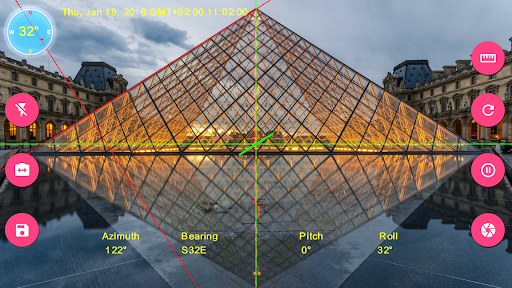


Laser Level app with records, gallery, charts and more features
Smart Tools Laser Level is augmented reality app for computing inclination, slopes, angle, compass and elevation and rotation values using sensors and drawings on camera. Features •3 different measurement modes(Laser level, angle by dragging with your finger or drawing angle with your finger) •Touch screen to set point of measurement or touch reset button to reset it to origin. •Display azimuth, direction, inclination or rotation angles.(Magnetic Field Sensor is required) •Fast and accurate calibration option. •Freeze screen to have more precise and robust readings. •Leveling option displays pitch and roll angles as line, square or circle which makes it easier to align your device and results more accurate measurements. •Option to toggle between back and front(if available) camera. •Flashlight for situations more light needed •Option to visualize your progress using charts. •Image gallery with details, Exif info(Some Exif data requires Android 7.0 and above), and other features such as image sharing and editing •Highly customizable app settings and user interface Instructions Measurement Screen Rotate your device on laser level measurement mode or align with object you want get readings from. To get more precise reading make sure that leveling line is aligned with laser level. You can freeze preview and measure any slope or angle easily. Swipe your screen right to open Navigation Menu Records Screen You can review your recorded measurements and get xls file using diskette button. Excel files are stored in selected directory. Charts Screen Records can be reviewed via charts using Charts section. It's possible to get image of the charts in JPG format using camera icon. Gallery Screen Gallery screen displays images inside the image directory selected using Settings screen. Touch an image to display details. Important: To display some of the Exif data your device must be Android 7.0 and above. Touching image on gallery opens zoomable version of image an IMPORTANT: If you find a bug using the application, PLEASE write to smarttoolfactory@icloud.com with your phone model name and the description of the problem, before writing a negative comment. 🤝 ✅ 👍Customer satisfaction is our priority, and we will do our best to fix the issues as soon as possible!
8 years on Google Play
This app isn't currently appearing in any tracked top charts.