
카카오톡 채팅분석 - TalkStat
Updated Aug 6, 2026 · v2.3

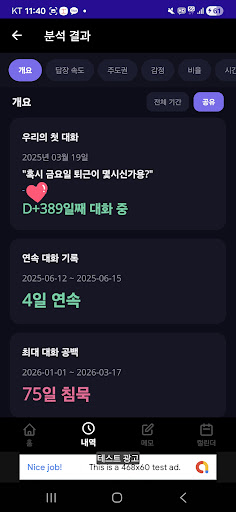


Just export your KakaoTalk conversations and you're done! Analyze reply speed, sentiment, activity patterns, and group chat management all at once.
KakaoTalk Conversations: See Them in Numbers for a New Perspective TalkStat is a conversation analysis app that analyzes exported KakaoTalk conversation files to provide various insights, including conversation patterns, emotional shifts, reply speed, and user activity. Usage is simple. Export conversations from a KakaoTalk chat room → Share to TalkStat, and the analysis will begin automatically. * Deeply analyze conversations with 11 types of analysis * 1. Overview Check a summary of your entire conversation at a glance, including the date of the first conversation, D+ days, consecutive conversation history, conversation ratios by user, and days of conversation spikes. 2. Reply Speed Who replies faster? Analyzes average, median, and fastest reply times, and also detects slow replies (suspected of ignoring messages). 3. Dominance Who starts the conversation first, and who ends it? Analyzes the number of questions asked and the average character count. 4. Emotion Discover monthly changes in conversation temperature, positive/negative/neutral ratios, and turning points in the mood. **KakaoTalk Conversations: See them in numbers for a fresh perspective** 5. Ratios Check the ratio of conversations, photos, and emoticons in intuitive charts. 6. Time Visualize changes in conversation volume by day of the week, time of day, and year/month in charts. 7. User Comparison Compare activity patterns among users by time of day, day of the week, and year. 8. Media Check statistics on photos, videos, emojis, files, and links, as well as rankings of sharing sites. 9. Word Analyze frequently used words, special expressions (lol, haha, etc.), and words frequently used by individual users. 10. Tone/Topic Analyze tone patterns and conversation topics by category, and suggest recommended conversation topics. 11. Group Chat Management Automatically classify member activity (Very Active/Active/Normal/Warning/Ghost) in group chats with 3 or more members, and view profiles in detail. * Chat Viewer * Recreate past conversations in speech bubble format. You can perform complex searches by keyword, date, user, and time zone, and save important messages with a double tap. * Memo & Calendar * Record thoughts that come to mind while analyzing as memos. General memos, member memos, saving important messages, checklists, labels, and notification settings. You can manage recurring events, time-based events, and events by category in the calendar. Schedules for reconfirming group chat members are also automatically generated. * Group Chat Member Management * We provide all the features necessary for group chat management, including automatic member classification, detailed profiles (activity statistics, weekly charts), designating members of interest, scheduling reconfirmations, and analyzing intimacy and mentions. * Share Results * Share text reports, summary cards, and image reports with your friends. * Privacy Protection * • All data is stored only on the device • No server transmission or external API calls • All data is automatically deleted upon app deletion • Analysis is possible even without an internet connection * How to Use * 1. KakaoTalk Chat Room → ☰ → Gear (Settings) → Export Conversation 2. Save Text Messages Only 3. Select TalkStat from Share To 4. Analysis completed automatically! Analyze your KakaoTalk conversations right now
0 years on Google Play
This app isn't currently appearing in any tracked top charts.