
Whiteboard - Draw & Teach
Updated Aug 2, 2026 · v2.8.5




Teaching whiteboard - smart board, drawing, notes, math & digital canvas
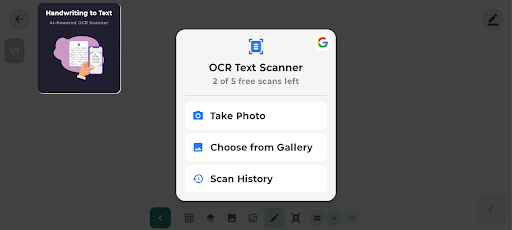
Whiteboard is your ultimate digital canvas for teachers, students, professionals, and creative minds. Whether you're explaining concepts, sketching ideas, or taking notes, this app transforms your device into a powerful smart whiteboard with stylus and S-Pen support. Built with AI-powered OCR scanner, smart shape detection, math formulas, web image search, table creator, customizable toolbar, multi-page PDF, and science stickers — everything to teach, plan, draw, and create offline. Key Features & Tools AI-Powered OCR Scanner (NEW) - Handwriting to Text — Scan handwritten notes or printed text and convert to digital text using AI - Multi-Language Support — Recognizes text in multiple languages - Camera & Gallery — Capture from camera or import images - Scan History — Access all previous scans anytime - Premium — One-time purchase for unlimited scans (5 free scans included) Smart Teaching Tools - Math Formula Tool — Display complex equations instantly - Smart Shape Detector — Auto-snap rough shapes to perfect geometry - Table Creator — Insert customizable tables for organized notes - Laser Pointer — Highlight parts of your board in real-time - Ruler Tool — Draw straight lines and measure angles - Infinite Canvas — Pan and zoom across unlimited space - Science Stickers — Lab equipment, biology, chemistry diagrams Drawing Instruments - Pen, Calligraphy Brush, Chalk, Highlighter, Marker, Eraser - Hand / Pan Tool — Navigate canvas without accidental drawing Stylus & Pen Support - Works with S-Pen, stylus, and any digital pen - Palm Rejection — Only pen draws, finger touch ignored - Pressure-sensitive drawing for natural handwriting Editing & Customization - Customizable Toolbar — Reorder tools to match your workflow - Tool Shortcut Bar — Floating toolbar with horizontal/vertical modes - Multiple Layers — Edit background without affecting foreground - Lasso / Selection — Move, resize, rotate, flip, or delete drawings - Custom Color Picker — Any exact color for brushes and shapes - Board Textures — Grid, dots, lines, graph paper, music staff, and more - Multi-Page Boards — Multiple pages in one session PDF Import & Export - Import PDF — Annotate, highlight, draw over PDFs - Export as PDF — Combine boards into one PDF - PDF Thumbnails & Bookmarks — Jump to any page instantly Camera & Image Tools - Camera Capture — Take photos and annotate on whiteboard - Image Import — Load gallery images, resize, and draw over them - Web Image Search — Add free images from web to your board Save, Export & Share - Auto-Save — Boards saved as you draw - Save to Gallery — Export as high-quality image - Share Anywhere — WhatsApp, Email, Drive, or any app - 100% Offline — Core features work without internet Perfect For: - Teachers — Explain visually, import PDFs, annotate live - Students — Take notes, scan handwriting to text, create tables - Professionals — Brainstorm, scan documents, sketch diagrams - Artists & Kids — Draw, sketch, practice calligraphy Download Whiteboard — smart canvas, AI OCR scanner, and teaching board! Free to use, supported by ads. Developer: AiTricker Contact: nonytoons2011@gmail.com
0 years on Google Play
This app isn't currently appearing in any tracked top charts.