
NeoDive : Diver Watch Face
Updated Oct 20, 2025 · vVARY


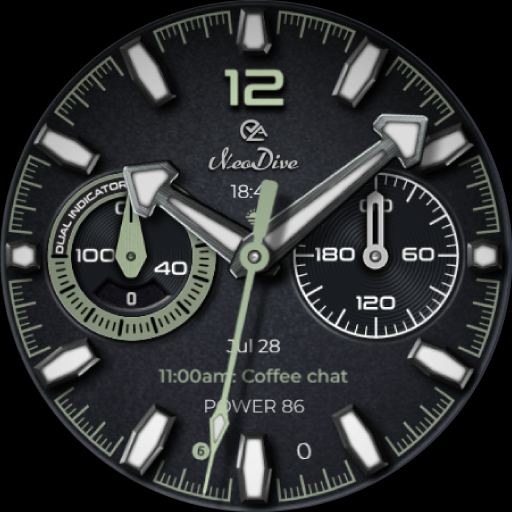


NeoDive, a premium diver watch face for Wear OS with full customization options.
NeoDive merges the timeless elegance of classic dive watches with the modern versatility of advanced smart features. FEATURE HIGHLIGHTS ❤️ Analog Heart Rate Counter – Elegant heart rate tracking in classic analog style. 🏃 Step Goal Tracker – Analog daily goal progress with a digital step count for precise tracking. ⚙️ 4 Custom Complications – Personalize your watch face with the data and tools you use most. 🚀 4 Quick-Access Shortcuts - Customizable for instant access. 🔋 Live Battery Status – Instantly check battery level and charging state at a glance. 🎨 30 Vibrant & Classic Color Themes – From bold tones to timeless shades to match any style. 👁 Hide or Show Shortcuts – Switch between a clean, minimalist look or an info-rich layout. 🖤 3 Refined Always-On Display Styles – Maintain elegance while maximizing battery efficiency. Compatibility: This watch face is designed for Wear OS devices running on Wear OS API 34+, including the Samsung Galaxy Watch 4, 5, 6, 7 and 8 as well as other supported Samsung Wear OS watches, Pixel Watches, and other Wear OS-compatible models from various brands. If you encounter any issues during installation, even with a compatible smartwatch, please refer to the detailed instructions in the companion app. For further assistance, feel free to reach out to us at support@timecanvaswatches.com or timecanvasapps@gmail.com. Note: The phone app serves as a companion to assist you in installing and locating the watch face on your Wear OS watch. You can choose your watch device from the installation drop-down menu and install the watch face directly on your watch. The companion app also offers details about the watch face features and installation instructions. If you no longer need it, you can uninstall the companion app from your phone at any time. How to Customize: To customize your watch face, touch and hold the screen, then tap Customize (or the settings/edit icon specific to your watch brand). Swipe left and right to browse customization options and swipe up and down to select styles from the available custom options. How to Set Custom Complications and Shortcuts: To set custom complications and shortcuts, touch and hold the screen, then tap Customize (or the settings/edit icon specific to your watch brand). Swipe left until you reach "Complications," then tap on the highlighted area for the complication or shortcut you want to set up. If you like our designs, don’t forget to check out our other watch faces, with more coming soon to Wear OS! For quick help, feel free to email us. Your feedback on the Google Play Store means a lot to us—let us know what you love, what we can improve, or any suggestions you have. We’re always excited to hear your design ideas!
1 year on Google Play
This app isn't currently appearing in any tracked top charts.